<?xml version="1.0" encoding="utf-8"?><?xml-stylesheet type="text/xsl" href="atom.xsl"?>
<feed xmlns="http://www.w3.org/2005/Atom">
    <id>https://doc.morphmind.ai/ko/whats-new</id>
    <title>MorphMind — What's New</title>
    <updated>2026-04-16T00:00:00.000Z</updated>
    <generator>https://github.com/jpmonette/feed</generator>
    <link rel="alternate" href="https://doc.morphmind.ai/ko/whats-new"/>
    <subtitle>Latest product updates and new features</subtitle>
    <icon>https://doc.morphmind.ai/ko/img/favicon.ico</icon>
    <rights>© 2026 MorphMind</rights>
    <entry>
        <title type="html"><![CDATA[Carry Forward: 이제 모든 파일이 함께]]></title>
        <id>https://doc.morphmind.ai/ko/whats-new/carry-forward-files</id>
        <link href="https://doc.morphmind.ai/ko/whats-new/carry-forward-files"/>
        <updated>2026-04-16T00:00:00.000Z</updated>
        <summary type="html"><![CDATA[Carry Forward가 이제 대화 요약뿐 아니라 이전 세션의 모든 파일을 새 세션으로 복사합니다.]]></summary>
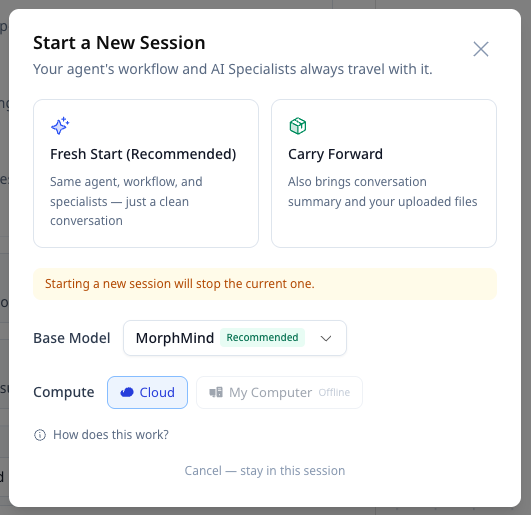
        <content type="html"><![CDATA[<p>사용자 요청에 따라, <strong>Carry Forward</strong>가 이제 대화 요약뿐 아니라 이전 세션의 <strong>모든 파일</strong>을 새 세션으로 가져옵니다.</p>
<!-- -->
<p>새 세션을 시작하면서 Carry Forward를 선택하면, 이전 세션에서 업로드한 모든 파일이 요약과 함께 복사되어 어떤 것도 빠지지 않습니다.</p>
<!-- -->
<img src="https://doc.morphmind.ai/ko/assets/images/carry-forward-files-204c98e2e3ab0d6f8ff185f29d87d663.png" alt="Fresh Start와 Carry Forward 옵션이 있는 새 세션 모달" style="max-width:480px;width:100%;border-radius:8px;border:1px solid #e2e8f0;margin-top:12px">
<div class="theme-admonition theme-admonition-tip admonition_xJq3 alert alert--success"><div class="admonitionHeading_Gvgb"><span class="admonitionIcon_Rf37"><svg viewBox="0 0 12 16"><path fill-rule="evenodd" d="M6.5 0C3.48 0 1 2.19 1 5c0 .92.55 2.25 1 3 1.34 2.25 1.78 2.78 2 4v1h5v-1c.22-1.22.66-1.75 2-4 .45-.75 1-2.08 1-3 0-2.81-2.48-5-5.5-5zm3.64 7.48c-.25.44-.47.8-.67 1.11-.86 1.41-1.25 2.06-1.45 3.23-.02.05-.02.11-.02.17H5c0-.06 0-.13-.02-.17-.2-1.17-.59-1.83-1.45-3.23-.2-.31-.42-.67-.67-1.11C2.44 6.78 2 5.65 2 5c0-2.2 2.02-4 4.5-4 1.22 0 2.36.42 3.22 1.19C10.55 2.94 11 3.94 11 5c0 .66-.44 1.78-.86 2.48zM4 14h5c-.23 1.14-1.3 2-2.5 2s-2.27-.86-2.5-2z"></path></svg></span>팁</div><div class="admonitionContent_BuS1"><p>같은 프로젝트 안에서 다른 연구, 실험, 워크플로를 새로 시작할 때는 여전히 <strong>Fresh Start</strong>를 권장합니다.</p></div></div>
<p><a href="https://agentlab.morphmind.ai/" target="_blank" rel="noopener noreferrer" class="">지금 사용해보기 →</a></p>]]></content>
        <category label="improvement" term="improvement"/>
        <category label="release-2026-04-16" term="release-2026-04-16"/>
    </entry>
    <entry>
        <title type="html"><![CDATA[Mac 및 Windows용 데스크톱 앱(Beta)]]></title>
        <id>https://doc.morphmind.ai/ko/whats-new/desktop-app-beta</id>
        <link href="https://doc.morphmind.ai/ko/whats-new/desktop-app-beta"/>
        <updated>2026-04-16T00:00:00.000Z</updated>
        <summary type="html"><![CDATA[로컬 파일과 컴퓨팅 파워에 연결되는 네이티브 데스크톱 앱. 현재 베타 버전입니다.]]></summary>
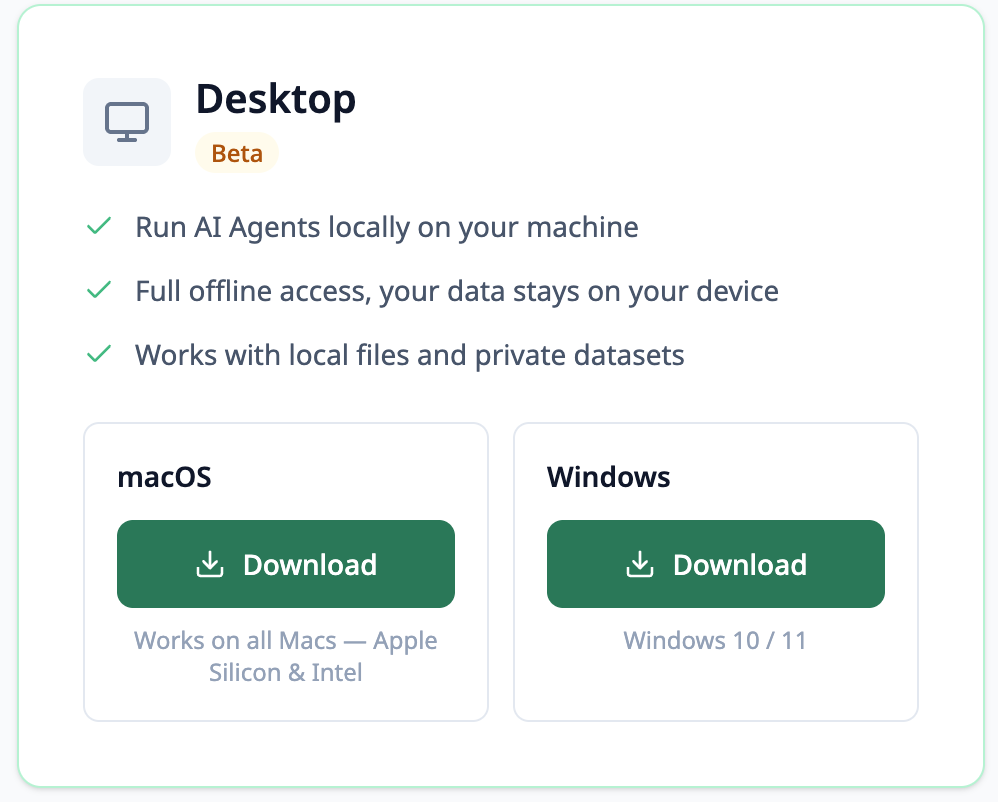
        <content type="html"><![CDATA[<p>MorphMind 데스크톱 앱이 이제 Mac과 Windows에서 <strong>베타</strong>로 제공됩니다. 클라우드 환경에 더해 로컬 파일과 로컬 컴퓨팅 파워에도 연결됩니다.</p>
<!-- -->
<ul>
<li class=""><strong>Cloud 모드</strong> — 빠른 작업, 멀티 디바이스 작업, 샌드박스 프로토타이핑에 적합</li>
<li class=""><strong>My Computer 모드</strong> — 대용량 데이터셋, 로컬 파일, 브라우저 자동화, 로컬 CPU/GPU 작업에 적합</li>
</ul>
<p>베타 기간 동안 일부 기능은 계속 다듬어지고 있습니다.</p>
<!-- -->
<img src="https://doc.morphmind.ai/ko/assets/images/desktop-app-cc1b602b5f5ce38a45c7aa6543b35cfd.png" alt="macOS 및 Windows용 데스크톱 앱 다운로드 옵션" style="max-width:480px;width:100%;border-radius:8px;border:1px solid #e2e8f0;margin-top:12px">
<div class="theme-admonition theme-admonition-tip admonition_xJq3 alert alert--success"><div class="admonitionHeading_Gvgb"><span class="admonitionIcon_Rf37"><svg viewBox="0 0 12 16"><path fill-rule="evenodd" d="M6.5 0C3.48 0 1 2.19 1 5c0 .92.55 2.25 1 3 1.34 2.25 1.78 2.78 2 4v1h5v-1c.22-1.22.66-1.75 2-4 .45-.75 1-2.08 1-3 0-2.81-2.48-5-5.5-5zm3.64 7.48c-.25.44-.47.8-.67 1.11-.86 1.41-1.25 2.06-1.45 3.23-.02.05-.02.11-.02.17H5c0-.06 0-.13-.02-.17-.2-1.17-.59-1.83-1.45-3.23-.2-.31-.42-.67-.67-1.11C2.44 6.78 2 5.65 2 5c0-2.2 2.02-4 4.5-4 1.22 0 2.36.42 3.22 1.19C10.55 2.94 11 3.94 11 5c0 .66-.44 1.78-.86 2.48zM4 14h5c-.23 1.14-1.3 2-2.5 2s-2.27-.86-2.5-2z"></path></svg></span>팁</div><div class="admonitionContent_BuS1"><p><a href="https://morphmind.ai/products" target="_blank" rel="noopener noreferrer" class="">morphmind.ai/products</a>에서 앱을 다운로드하세요.</p></div></div>
<p><a href="https://morphmind.ai/products" target="_blank" rel="noopener noreferrer" class="">데스크톱 앱 받기 →</a></p>]]></content>
        <category label="feature" term="feature"/>
        <category label="release-2026-04-16" term="release-2026-04-16"/>
    </entry>
    <entry>
        <title type="html"><![CDATA[MM Assistant: 두 개의 새 도우미 버튼]]></title>
        <id>https://doc.morphmind.ai/ko/whats-new/mm-assistant-helpers</id>
        <link href="https://doc.morphmind.ai/ko/whats-new/mm-assistant-helpers"/>
        <updated>2026-04-16T00:00:00.000Z</updated>
        <summary type="html"><![CDATA[MM Assistant에 빠른 접근 버튼 두 개가 추가되었습니다 — 세션 크레딧 사용량과 맞춤형 커뮤니케이션 팁.]]></summary>
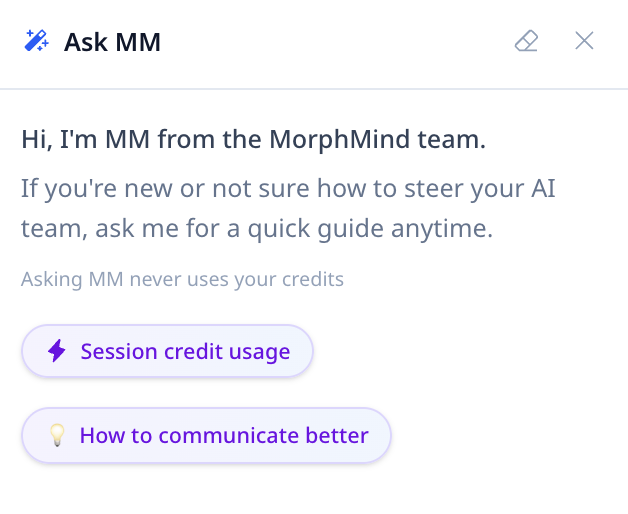
        <content type="html"><![CDATA[<p>MM Assistant와 채팅을 열면 이제 두 개의 새 버튼이 보입니다.</p>
<!-- -->
<ul>
<li class=""><strong>Session credit usage</strong> — 현재 세션에서 지금까지 사용한 크레딧을 확인</li>
<li class=""><strong>How to communicate better</strong> — 최근 상호작용을 바탕으로 한 맞춤형 협업 팁</li>
</ul>
<!-- -->
<img src="https://doc.morphmind.ai/ko/assets/images/mm-assistant-0431fd58aeff73c0a6c667b6bcbcac17.png" alt="Session credit usage와 How to communicate better 버튼이 있는 MM Assistant 채팅 패널" style="max-width:480px;width:100%;border-radius:8px;border:1px solid #e2e8f0;margin-top:12px">
<div class="theme-admonition theme-admonition-tip admonition_xJq3 alert alert--success"><div class="admonitionHeading_Gvgb"><span class="admonitionIcon_Rf37"><svg viewBox="0 0 12 16"><path fill-rule="evenodd" d="M6.5 0C3.48 0 1 2.19 1 5c0 .92.55 2.25 1 3 1.34 2.25 1.78 2.78 2 4v1h5v-1c.22-1.22.66-1.75 2-4 .45-.75 1-2.08 1-3 0-2.81-2.48-5-5.5-5zm3.64 7.48c-.25.44-.47.8-.67 1.11-.86 1.41-1.25 2.06-1.45 3.23-.02.05-.02.11-.02.17H5c0-.06 0-.13-.02-.17-.2-1.17-.59-1.83-1.45-3.23-.2-.31-.42-.67-.67-1.11C2.44 6.78 2 5.65 2 5c0-2.2 2.02-4 4.5-4 1.22 0 2.36.42 3.22 1.19C10.55 2.94 11 3.94 11 5c0 .66-.44 1.78-.86 2.48zM4 14h5c-.23 1.14-1.3 2-2.5 2s-2.27-.86-2.5-2z"></path></svg></span>팁</div><div class="admonitionContent_BuS1"><p>MM Assistant 사용은 크레딧을 소모하지 않습니다.</p></div></div>
<p><a href="https://agentlab.morphmind.ai/" target="_blank" rel="noopener noreferrer" class="">지금 사용해보기 →</a></p>]]></content>
        <category label="feature" term="feature"/>
        <category label="release-2026-04-16" term="release-2026-04-16"/>
    </entry>
    <entry>
        <title type="html"><![CDATA[My Team: 모든 전문가를 한 곳에서]]></title>
        <id>https://doc.morphmind.ai/ko/whats-new/my-team</id>
        <link href="https://doc.morphmind.ai/ko/whats-new/my-team"/>
        <updated>2026-04-16T00:00:00.000Z</updated>
        <summary type="html"><![CDATA[새로운 사이드바 섹션에서 모든 프로젝트의 AI 전문가를 한눈에 — 스킬, 메모리, 배정 상태까지.]]></summary>
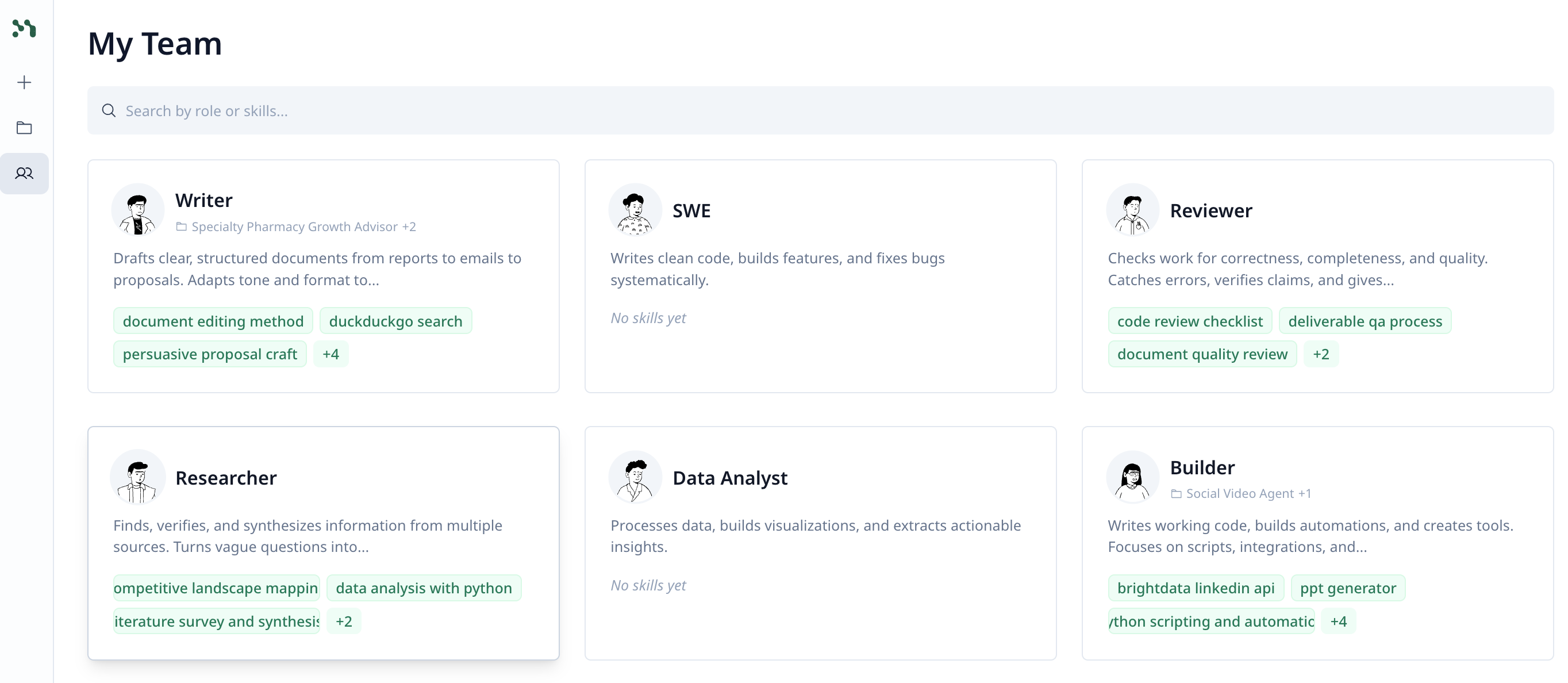
        <content type="html"><![CDATA[<p>왼쪽 사이드바의 새로운 <strong>My Team</strong> 섹션은 보유한 모든 AI 전문가를 한 화면에서 보여줍니다.</p>
<!-- -->
<ul>
<li class=""><strong>스킬과 메모리 관리</strong> — 개별 에이전트를 열지 않고도 어떤 전문가든 스킬과 메모리를 조정</li>
<li class=""><strong>배정 상황 확인</strong> — 각 전문가가 어떤 에이전트와 프로젝트에 참여 중인지 확인</li>
<li class=""><strong>단일 진실 소스</strong> — 전문가의 스킬, 메모리, 경험이 모든 프로젝트로 함께 이동</li>
</ul>
<!-- -->
<img src="https://doc.morphmind.ai/ko/assets/images/my-team-1c2a408c685edcd3ccc981bb43b5a33e.png" alt="역할과 스킬이 표시된 모든 AI 전문가의 My Team 페이지" style="max-width:720px;width:100%;border-radius:8px;border:1px solid #e2e8f0;margin-top:12px">
<div class="theme-admonition theme-admonition-tip admonition_xJq3 alert alert--success"><div class="admonitionHeading_Gvgb"><span class="admonitionIcon_Rf37"><svg viewBox="0 0 12 16"><path fill-rule="evenodd" d="M6.5 0C3.48 0 1 2.19 1 5c0 .92.55 2.25 1 3 1.34 2.25 1.78 2.78 2 4v1h5v-1c.22-1.22.66-1.75 2-4 .45-.75 1-2.08 1-3 0-2.81-2.48-5-5.5-5zm3.64 7.48c-.25.44-.47.8-.67 1.11-.86 1.41-1.25 2.06-1.45 3.23-.02.05-.02.11-.02.17H5c0-.06 0-.13-.02-.17-.2-1.17-.59-1.83-1.45-3.23-.2-.31-.42-.67-.67-1.11C2.44 6.78 2 5.65 2 5c0-2.2 2.02-4 4.5-4 1.22 0 2.36.42 3.22 1.19C10.55 2.94 11 3.94 11 5c0 .66-.44 1.78-.86 2.48zM4 14h5c-.23 1.14-1.3 2-2.5 2s-2.27-.86-2.5-2z"></path></svg></span>팁</div><div class="admonitionContent_BuS1"><p>전문가는 프로젝트 사이를 오갈 때 자신의 스킬, 메모리, 경험을 그대로 가지고 다닙니다.</p></div></div>
<p><a href="https://agentlab.morphmind.ai/" target="_blank" rel="noopener noreferrer" class="">My Team 열기 →</a></p>]]></content>
        <category label="feature" term="feature"/>
        <category label="release-2026-04-16" term="release-2026-04-16"/>
    </entry>
    <entry>
        <title type="html"><![CDATA[Universal Connect: 거의 모든 서비스 또는 API에 연결]]></title>
        <id>https://doc.morphmind.ai/ko/whats-new/universal-connect</id>
        <link href="https://doc.morphmind.ai/ko/whats-new/universal-connect"/>
        <updated>2026-04-16T00:00:00.000Z</updated>
        <summary type="html"><![CDATA[에이전트를 거의 모든 서드파티 서비스, API, 하드웨어에 연결하세요 — 본인의 키를 가져와 계정에 안전하게 보관합니다.]]></summary>
        <content type="html"><![CDATA[<p>에이전트가 이제 거의 모든 외부 서비스에 연결할 수 있습니다 — 그냥 요청하거나, 어떤 서비스를 사용할지 알려주고 API 키를 직접 제공하세요.</p>
<!-- -->
<ul>
<li class=""><strong>본인의 키 사용</strong> — 공유한 내용은 계정 아래 안전하게 보관됩니다</li>
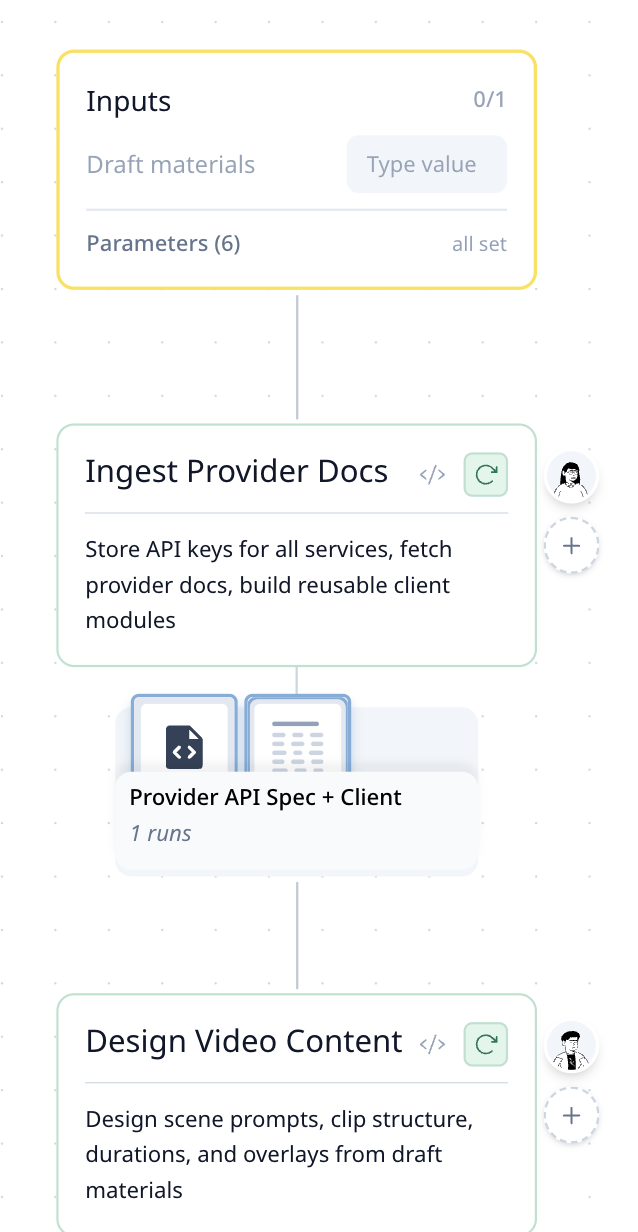
<li class=""><strong>단계 간 재사용</strong> — 에이전트가 키를 클라이언트 모듈에 저장해 모든 후속 단계에서 호출 가능</li>
<li class=""><strong>소프트웨어 이상</strong> — 물리적 로봇과 하드웨어도 연결 가능, API 엔드포인트만 있으면 됩니다</li>
</ul>
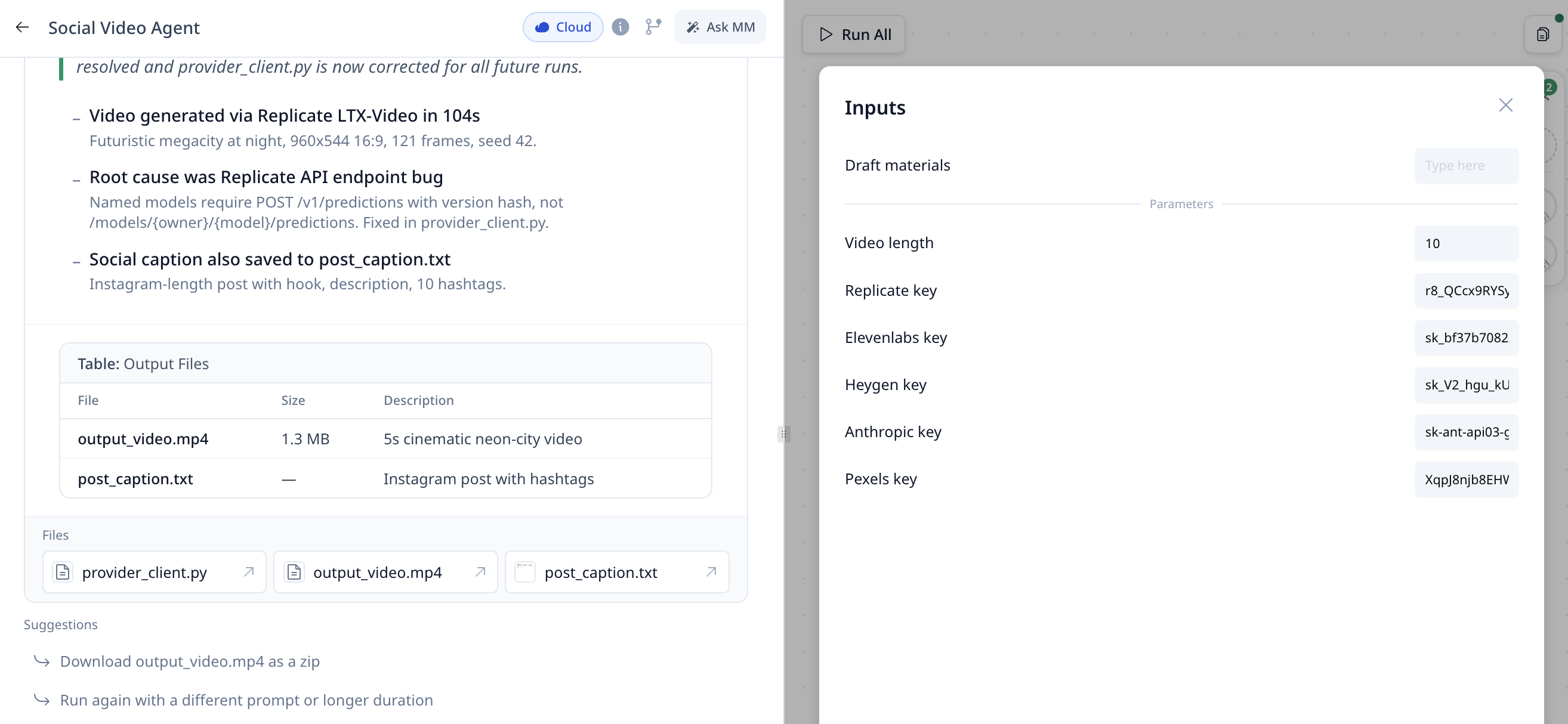
<p>예를 들어 Social Video Agent는 Replicate(영상), ElevenLabs(음성), Heygen(아바타), Anthropic(글쓰기), Pexels(스톡 미디어) 다섯 서비스에 동시에 연결될 수 있으며, 각 키는 Inputs 패널에 한 번만 입력하면 됩니다.</p>
<!-- -->
<img src="https://doc.morphmind.ai/ko/assets/images/universal-connect-9ce6470fe9f685d7cad0699bcc7765e2.png" alt="Replicate, ElevenLabs, Heygen, Anthropic, Pexels 키가 있는 Social Video Agent의 Inputs 패널" style="max-width:720px;width:100%;border-radius:8px;border:1px solid #e2e8f0;margin-top:12px">
<img src="https://doc.morphmind.ai/ko/assets/images/universal-connect-workflow-b97ce58cb3e75873221159d6bc01ced2.png" alt="공유 클라이언트 모듈을 통해 API 키가 후속 단계에서 재사용되는 워크플로" style="max-width:480px;width:100%;border-radius:8px;border:1px solid #e2e8f0;margin-top:12px">
<div class="theme-admonition theme-admonition-tip admonition_xJq3 alert alert--success"><div class="admonitionHeading_Gvgb"><span class="admonitionIcon_Rf37"><svg viewBox="0 0 12 16"><path fill-rule="evenodd" d="M6.5 0C3.48 0 1 2.19 1 5c0 .92.55 2.25 1 3 1.34 2.25 1.78 2.78 2 4v1h5v-1c.22-1.22.66-1.75 2-4 .45-.75 1-2.08 1-3 0-2.81-2.48-5-5.5-5zm3.64 7.48c-.25.44-.47.8-.67 1.11-.86 1.41-1.25 2.06-1.45 3.23-.02.05-.02.11-.02.17H5c0-.06 0-.13-.02-.17-.2-1.17-.59-1.83-1.45-3.23-.2-.31-.42-.67-.67-1.11C2.44 6.78 2 5.65 2 5c0-2.2 2.02-4 4.5-4 1.22 0 2.36.42 3.22 1.19C10.55 2.94 11 3.94 11 5c0 .66-.44 1.78-.86 2.48zM4 14h5c-.23 1.14-1.3 2-2.5 2s-2.27-.86-2.5-2z"></path></svg></span>팁</div><div class="admonitionContent_BuS1"><p>키는 한 번만 입력하면 에이전트의 워크플로 전체에서 재사용됩니다 — 단계마다 다시 붙여넣을 필요가 없습니다.</p></div></div>
<p><a href="https://agentlab.morphmind.ai/" target="_blank" rel="noopener noreferrer" class="">지금 사용해보기 →</a></p>]]></content>
        <category label="feature" term="feature"/>
        <category label="release-2026-04-16" term="release-2026-04-16"/>
    </entry>
    <entry>
        <title type="html"><![CDATA[매일 무료 MM Beans 500개]]></title>
        <id>https://doc.morphmind.ai/ko/whats-new/daily-mm-beans</id>
        <link href="https://doc.morphmind.ai/ko/whats-new/daily-mm-beans"/>
        <updated>2026-04-02T00:00:00.000Z</updated>
        <summary type="html"><![CDATA[모든 사용자에게 매일 500개의 MM Beans가 자동으로 제공되며, 매일 초기화됩니다.]]></summary>
        <content type="html"><![CDATA[<p>모든 사용자에게 매일 <strong>MM Beans 500개</strong>가 자동으로 제공되며, 매일 초기화됩니다.</p>
<!-- -->
<!-- -->
<img src="https://doc.morphmind.ai/ko/assets/images/daily-free-credits-referral-rewards-c3e3705ccb34856d25997c05bbf65656.png" alt="매일 무료 크레딧과 추천 보상 패널" style="max-width:720px;width:100%;border-radius:8px;border:1px solid #e2e8f0;margin-top:12px">
<div class="theme-admonition theme-admonition-tip admonition_xJq3 alert alert--success"><div class="admonitionHeading_Gvgb"><span class="admonitionIcon_Rf37"><svg viewBox="0 0 12 16"><path fill-rule="evenodd" d="M6.5 0C3.48 0 1 2.19 1 5c0 .92.55 2.25 1 3 1.34 2.25 1.78 2.78 2 4v1h5v-1c.22-1.22.66-1.75 2-4 .45-.75 1-2.08 1-3 0-2.81-2.48-5-5.5-5zm3.64 7.48c-.25.44-.47.8-.67 1.11-.86 1.41-1.25 2.06-1.45 3.23-.02.05-.02.11-.02.17H5c0-.06 0-.13-.02-.17-.2-1.17-.59-1.83-1.45-3.23-.2-.31-.42-.67-.67-1.11C2.44 6.78 2 5.65 2 5c0-2.2 2.02-4 4.5-4 1.22 0 2.36.42 3.22 1.19C10.55 2.94 11 3.94 11 5c0 .66-.44 1.78-.86 2.48zM4 14h5c-.23 1.14-1.3 2-2.5 2s-2.27-.86-2.5-2z"></path></svg></span>팁</div><div class="admonitionContent_BuS1"><p>크레딧 사용 순서: 매일 무료 → 월간 할당 → 보너스 크레딧 → 구매한 크레딧.</p></div></div>
<p><a href="https://agentlab.morphmind.ai/" target="_blank" rel="noopener noreferrer" class="">잔액 확인하기 →</a></p>]]></content>
        <category label="feature" term="feature"/>
        <category label="release-2026-04-02" term="release-2026-04-02"/>
    </entry>
    <entry>
        <title type="html"><![CDATA[수식이 이제 올바르게 렌더링됩니다]]></title>
        <id>https://doc.morphmind.ai/ko/whats-new/formula-rendering</id>
        <link href="https://doc.morphmind.ai/ko/whats-new/formula-rendering"/>
        <updated>2026-04-02T00:00:00.000Z</updated>
        <summary type="html"><![CDATA[AI 출력의 아래첨자, 위첨자, 그리스 문자, 과학 표기법이 이제 제대로 표시됩니다.]]></summary>
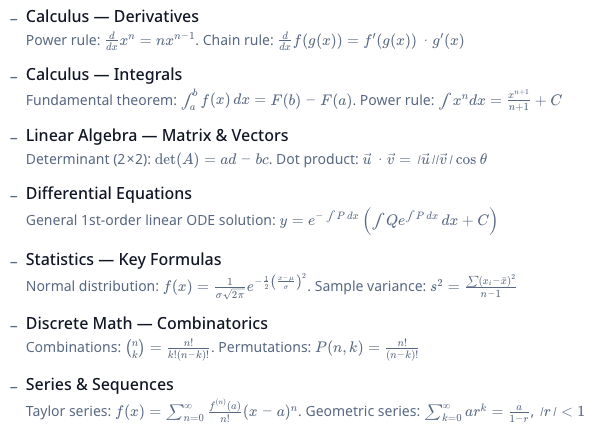
        <content type="html"><![CDATA[<p>AI 출력의 수식과 과학 표기법(아래첨자, 위첨자, 그리스 문자)이 이제 원시 텍스트가 아닌 올바른 형태로 렌더링됩니다.</p>
<!-- -->
<p>방정식, 단위, 화학 표기법을 다루는 작업이라면, 이제 에이전트의 출력이 제대로 조판됩니다 — 더 이상 <code>H_2O</code>를 평문으로 읽을 필요가 없습니다.</p>
<!-- -->
<img src="https://doc.morphmind.ai/ko/assets/images/formula-rendering-6dbd153c8b98db8d1894db6b8dae9afb.png" alt="수식 렌더링 예시" style="max-width:720px;width:100%;border-radius:8px;border:1px solid #e2e8f0;margin-top:12px">
<p><a href="https://agentlab.morphmind.ai/" target="_blank" rel="noopener noreferrer" class="">직접 확인하기 →</a></p>]]></content>
        <category label="fix" term="fix"/>
        <category label="release-2026-04-02" term="release-2026-04-02"/>
    </entry>
    <entry>
        <title type="html"><![CDATA[긴 문서를 챕터 단위로 생성]]></title>
        <id>https://doc.morphmind.ai/ko/whats-new/long-document-generation</id>
        <link href="https://doc.morphmind.ai/ko/whats-new/long-document-generation"/>
        <updated>2026-04-02T00:00:00.000Z</updated>
        <summary type="html"><![CDATA[긴 글쓰기 작업이 이제 챕터별로 나뉘어 하나씩 생성됩니다 — 진행 상황을 보고 중간에 방향을 조정할 수 있습니다.]]></summary>
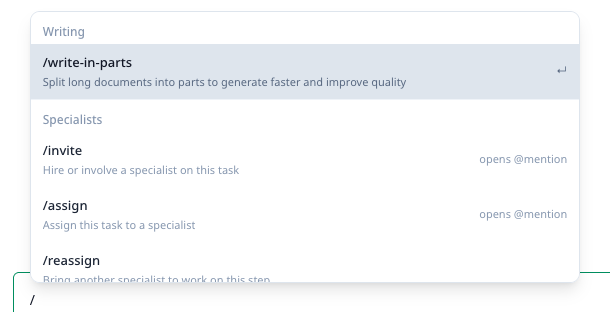
        <content type="html"><![CDATA[<p>리포트, 논문, 장문 문서를 작성할 때 MorphMind는 이제 <strong>한 번에 한 챕터씩</strong> 작성합니다. <code>01_introduction.md</code>, <code>02_data_analysis.md</code>, <code>03_conclusion.md</code> 같은 파일이 완료되는 대로 프로젝트에 나타납니다.</p>
<!-- -->
<ul>
<li class=""><strong>짧은 단위</strong> — 장시간 실행 작업으로 인한 중단을 방지</li>
<li class=""><strong>진행 상황 가시화</strong> — 몇 시간을 기다리지 않고 중간에 검토하고 방향을 조정</li>
<li class=""><strong>자동 병합</strong> — 최종 문서는 자동으로 합쳐져 PDF / DOCX로 변환됩니다</li>
</ul>
<p>채팅창에서 <code>/write-in-parts</code>를 입력하면 수동으로도 실행할 수 있습니다.</p>
<!-- -->
<img src="https://doc.morphmind.ai/ko/assets/images/long-document-generation-19f6c84406ea1a0a9df54cbfc7af82a7.png" alt="프로젝트 파일 패널에서 챕터로 분할된 긴 문서" style="max-width:720px;width:100%;border-radius:8px;border:1px solid #e2e8f0;margin-top:12px">
<div class="theme-admonition theme-admonition-tip admonition_xJq3 alert alert--success"><div class="admonitionHeading_Gvgb"><span class="admonitionIcon_Rf37"><svg viewBox="0 0 12 16"><path fill-rule="evenodd" d="M6.5 0C3.48 0 1 2.19 1 5c0 .92.55 2.25 1 3 1.34 2.25 1.78 2.78 2 4v1h5v-1c.22-1.22.66-1.75 2-4 .45-.75 1-2.08 1-3 0-2.81-2.48-5-5.5-5zm3.64 7.48c-.25.44-.47.8-.67 1.11-.86 1.41-1.25 2.06-1.45 3.23-.02.05-.02.11-.02.17H5c0-.06 0-.13-.02-.17-.2-1.17-.59-1.83-1.45-3.23-.2-.31-.42-.67-.67-1.11C2.44 6.78 2 5.65 2 5c0-2.2 2.02-4 4.5-4 1.22 0 2.36.42 3.22 1.19C10.55 2.94 11 3.94 11 5c0 .66-.44 1.78-.86 2.48zM4 14h5c-.23 1.14-1.3 2-2.5 2s-2.27-.86-2.5-2z"></path></svg></span>팁</div><div class="admonitionContent_BuS1"><p>프로젝트 파일 패널에서 챕터별 생성 진행 상황을 실시간으로 확인할 수 있습니다.</p></div></div>
<p><a href="https://agentlab.morphmind.ai/" target="_blank" rel="noopener noreferrer" class="">지금 사용해보기 →</a></p>]]></content>
        <category label="feature" term="feature"/>
        <category label="release-2026-04-02" term="release-2026-04-02"/>
    </entry>
    <entry>
        <title type="html"><![CDATA[베이스 모델 간 전환]]></title>
        <id>https://doc.morphmind.ai/ko/whats-new/model-switching</id>
        <link href="https://doc.morphmind.ai/ko/whats-new/model-switching"/>
        <updated>2026-04-02T00:00:00.000Z</updated>
        <summary type="html"><![CDATA[에이전트를 구동하는 기본 LLM을 선택하세요 — Claude, DeepSeek, GPT-4.1, Kimi, MiniMax 등.]]></summary>
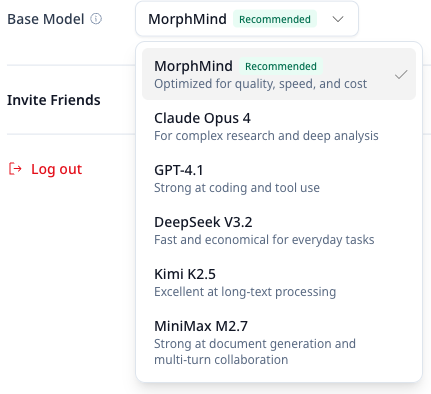
        <content type="html"><![CDATA[<p>작업에 맞춰 <strong>계정 설정</strong>에서 다른 베이스 모델을 선택할 수 있습니다.</p>
<!-- -->
<ul>
<li class=""><strong>MorphMind(기본)</strong> — 워크플로 협업과 멀티 에이전트 시나리오에 최적화</li>
<li class=""><strong>Claude Opus 4</strong> — 복잡한 연구와 심층 분석</li>
<li class=""><strong>DeepSeek V3</strong> — 일상 작업에 빠르고 경제적</li>
<li class=""><strong>GPT-4.1</strong> — 코딩과 툴 호출에서 우수</li>
<li class=""><strong>Kimi K2.5</strong> — 뛰어난 롱컨텍스트 처리</li>
<li class=""><strong>MiniMax M2.7</strong> — 문서 생성과 다중 턴 협업</li>
</ul>
<!-- -->
<img src="https://doc.morphmind.ai/ko/assets/images/model-switching-39bb955af7f44586629e94531fabf66c.png" alt="계정 설정의 모델 선택기" style="max-width:480px;width:100%;border-radius:8px;border:1px solid #e2e8f0;margin-top:12px">
<div class="theme-admonition theme-admonition-tip admonition_xJq3 alert alert--success"><div class="admonitionHeading_Gvgb"><span class="admonitionIcon_Rf37"><svg viewBox="0 0 12 16"><path fill-rule="evenodd" d="M6.5 0C3.48 0 1 2.19 1 5c0 .92.55 2.25 1 3 1.34 2.25 1.78 2.78 2 4v1h5v-1c.22-1.22.66-1.75 2-4 .45-.75 1-2.08 1-3 0-2.81-2.48-5-5.5-5zm3.64 7.48c-.25.44-.47.8-.67 1.11-.86 1.41-1.25 2.06-1.45 3.23-.02.05-.02.11-.02.17H5c0-.06 0-.13-.02-.17-.2-1.17-.59-1.83-1.45-3.23-.2-.31-.42-.67-.67-1.11C2.44 6.78 2 5.65 2 5c0-2.2 2.02-4 4.5-4 1.22 0 2.36.42 3.22 1.19C10.55 2.94 11 3.94 11 5c0 .66-.44 1.78-.86 2.48zM4 14h5c-.23 1.14-1.3 2-2.5 2s-2.27-.86-2.5-2z"></path></svg></span>팁</div><div class="admonitionContent_BuS1"><p>변경 사항은 다음 새 세션부터 적용됩니다. 모델을 전환해도 워크플로, 전문가 지식, 기존 스킬에는 영향을 주지 않습니다.</p></div></div>
<p><a href="https://agentlab.morphmind.ai/" target="_blank" rel="noopener noreferrer" class="">계정 설정 열기 →</a></p>]]></content>
        <category label="feature" term="feature"/>
        <category label="release-2026-04-02" term="release-2026-04-02"/>
    </entry>
    <entry>
        <title type="html"><![CDATA[새 세션 모드: Fresh Start vs Carry Forward]]></title>
        <id>https://doc.morphmind.ai/ko/whats-new/new-session-modes</id>
        <link href="https://doc.morphmind.ai/ko/whats-new/new-session-modes"/>
        <updated>2026-04-02T00:00:00.000Z</updated>
        <summary type="html"><![CDATA[같은 에이전트로 새 세션을 시작할 때, 기록을 그대로 둘지 이어갈지 선택할 수 있습니다.]]></summary>
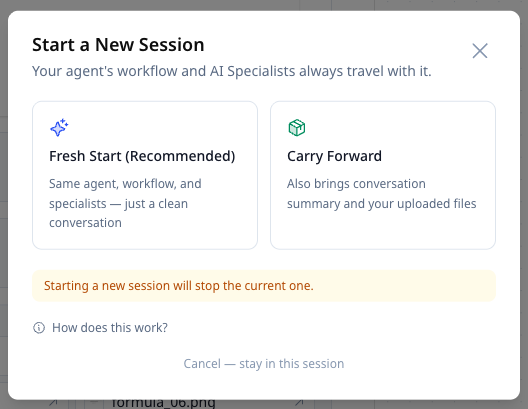
        <content type="html"><![CDATA[<p>같은 에이전트로 새 세션을 시작할 때, 이제 기록을 어떻게 처리할지 선택할 수 있습니다.</p>
<!-- -->
<ul>
<li class=""><strong>Fresh Start</strong> — 동일한 에이전트와 전문가는 유지하며, 채팅 기록과 파일은 현재 세션에 그대로 남깁니다.</li>
<li class=""><strong>Carry Forward</strong> — 현재 대화의 핵심을 요약하고 업로드한 파일을 새 세션으로 이어갑니다.</li>
</ul>
<!-- -->
<img src="https://doc.morphmind.ai/ko/assets/images/new-session-fresh-start-4d2727719a5f9329ebb691778814121d.png" alt="Fresh Start와 Carry Forward 옵션이 있는 새 세션 안내" style="max-width:480px;width:100%;border-radius:8px;border:1px solid #e2e8f0;margin-top:12px">
<div class="theme-admonition theme-admonition-tip admonition_xJq3 alert alert--success"><div class="admonitionHeading_Gvgb"><span class="admonitionIcon_Rf37"><svg viewBox="0 0 12 16"><path fill-rule="evenodd" d="M6.5 0C3.48 0 1 2.19 1 5c0 .92.55 2.25 1 3 1.34 2.25 1.78 2.78 2 4v1h5v-1c.22-1.22.66-1.75 2-4 .45-.75 1-2.08 1-3 0-2.81-2.48-5-5.5-5zm3.64 7.48c-.25.44-.47.8-.67 1.11-.86 1.41-1.25 2.06-1.45 3.23-.02.05-.02.11-.02.17H5c0-.06 0-.13-.02-.17-.2-1.17-.59-1.83-1.45-3.23-.2-.31-.42-.67-.67-1.11C2.44 6.78 2 5.65 2 5c0-2.2 2.02-4 4.5-4 1.22 0 2.36.42 3.22 1.19C10.55 2.94 11 3.94 11 5c0 .66-.44 1.78-.86 2.48zM4 14h5c-.23 1.14-1.3 2-2.5 2s-2.27-.86-2.5-2z"></path></svg></span>팁</div><div class="admonitionContent_BuS1"><p>한 번에 하나의 세션만 실행할 수 있으므로 에이전트가 집중을 유지하고 대화 간 간섭을 방지합니다. 이전 세션은 언제든 다시 열어 확인할 수 있습니다.</p></div></div>
<p><a href="https://agentlab.morphmind.ai/" target="_blank" rel="noopener noreferrer" class="">지금 사용해보기 →</a></p>]]></content>
        <category label="feature" term="feature"/>
        <category label="release-2026-04-02" term="release-2026-04-02"/>
    </entry>
    <entry>
        <title type="html"><![CDATA[추천 1건당 1,000 크레딧 적립]]></title>
        <id>https://doc.morphmind.ai/ko/whats-new/referral-rewards</id>
        <link href="https://doc.morphmind.ai/ko/whats-new/referral-rewards"/>
        <updated>2026-04-02T00:00:00.000Z</updated>
        <summary type="html"><![CDATA[개인 추천 코드를 생성하세요. 친구가 가입하고 사용 기준을 충족하면, 두 분 모두 1,000 크레딧을 받습니다.]]></summary>
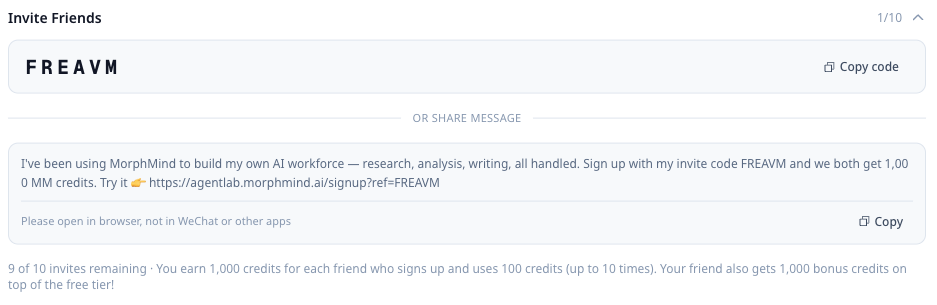
        <content type="html"><![CDATA[<p><strong>구독</strong> 페이지에서 개인 추천 코드를 생성하세요. 친구가 가입하고 사용 기준을 충족하면 <strong>두 분 모두 1,000 크레딧</strong>을 받습니다.</p>
<!-- -->
<div class="theme-admonition theme-admonition-tip admonition_xJq3 alert alert--success"><div class="admonitionHeading_Gvgb"><span class="admonitionIcon_Rf37"><svg viewBox="0 0 12 16"><path fill-rule="evenodd" d="M6.5 0C3.48 0 1 2.19 1 5c0 .92.55 2.25 1 3 1.34 2.25 1.78 2.78 2 4v1h5v-1c.22-1.22.66-1.75 2-4 .45-.75 1-2.08 1-3 0-2.81-2.48-5-5.5-5zm3.64 7.48c-.25.44-.47.8-.67 1.11-.86 1.41-1.25 2.06-1.45 3.23-.02.05-.02.11-.02.17H5c0-.06 0-.13-.02-.17-.2-1.17-.59-1.83-1.45-3.23-.2-.31-.42-.67-.67-1.11C2.44 6.78 2 5.65 2 5c0-2.2 2.02-4 4.5-4 1.22 0 2.36.42 3.22 1.19C10.55 2.94 11 3.94 11 5c0 .66-.44 1.78-.86 2.48zM4 14h5c-.23 1.14-1.3 2-2.5 2s-2.27-.86-2.5-2z"></path></svg></span>팁</div><div class="admonitionContent_BuS1"><p>구독 페이지 하단에서 추천 코드, 남은 초대 수, 추천 기록을 확인할 수 있습니다.</p></div></div>
<p><a href="https://agentlab.morphmind.ai/" target="_blank" rel="noopener noreferrer" class="">추천 코드 받기 →</a></p>]]></content>
        <category label="feature" term="feature"/>
        <category label="release-2026-04-02" term="release-2026-04-02"/>
    </entry>
    <entry>
        <title type="html"><![CDATA[세션 복잡도 알림]]></title>
        <id>https://doc.morphmind.ai/ko/whats-new/session-complexity-warning</id>
        <link href="https://doc.morphmind.ai/ko/whats-new/session-complexity-warning"/>
        <updated>2026-04-02T00:00:00.000Z</updated>
        <summary type="html"><![CDATA[대화가 너무 길거나 복잡해지면, 시스템이 더 나은 경험을 위해 새 세션 시작을 제안합니다.]]></summary>
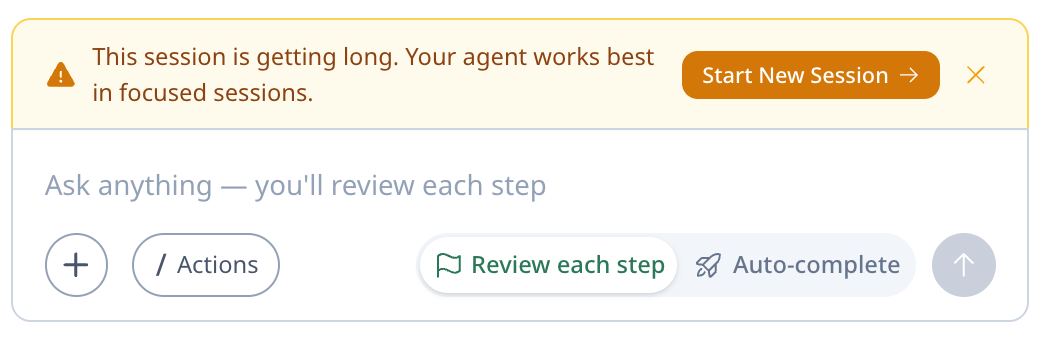
        <content type="html"><![CDATA[<p>대화가 너무 길거나 복잡해지면, 시스템이 더 나은 경험을 위해 새 세션 시작을 제안합니다.</p>
<!-- -->
<p>이렇게 하면 응답이 집중을 유지하고, 긴 세션에서 품질이 떨어지는 것을 방지할 수 있습니다. 채팅에 부드러운 알림이 나타나며, Fresh Start 또는 Carry Forward 중 선택할 수 있습니다.</p>
<!-- -->
<img src="https://doc.morphmind.ai/ko/assets/images/session-complexity-warning-372d00574ea4ffa24509d8ed5ec1cd46.png" alt="세션 복잡도 알림 메시지" style="max-width:720px;width:100%;border-radius:8px;border:1px solid #e2e8f0;margin-top:12px">
<p><a href="https://agentlab.morphmind.ai/" target="_blank" rel="noopener noreferrer" class="">지금 사용해보기 →</a></p>]]></content>
        <category label="improvement" term="improvement"/>
        <category label="release-2026-04-02" term="release-2026-04-02"/>
    </entry>
    <entry>
        <title type="html"><![CDATA[세션을 리플레이 링크로 공유]]></title>
        <id>https://doc.morphmind.ai/ko/whats-new/share-replay</id>
        <link href="https://doc.morphmind.ai/ko/whats-new/share-replay"/>
        <updated>2026-04-02T00:00:00.000Z</updated>
        <summary type="html"><![CDATA[리플레이 링크를 생성하면 누구나 영상 재생처럼 세션을 시청할 수 있습니다.]]></summary>
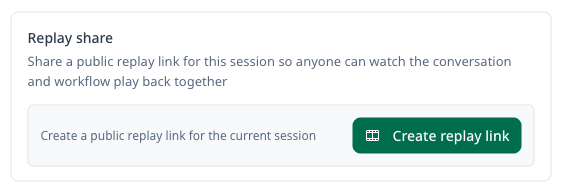
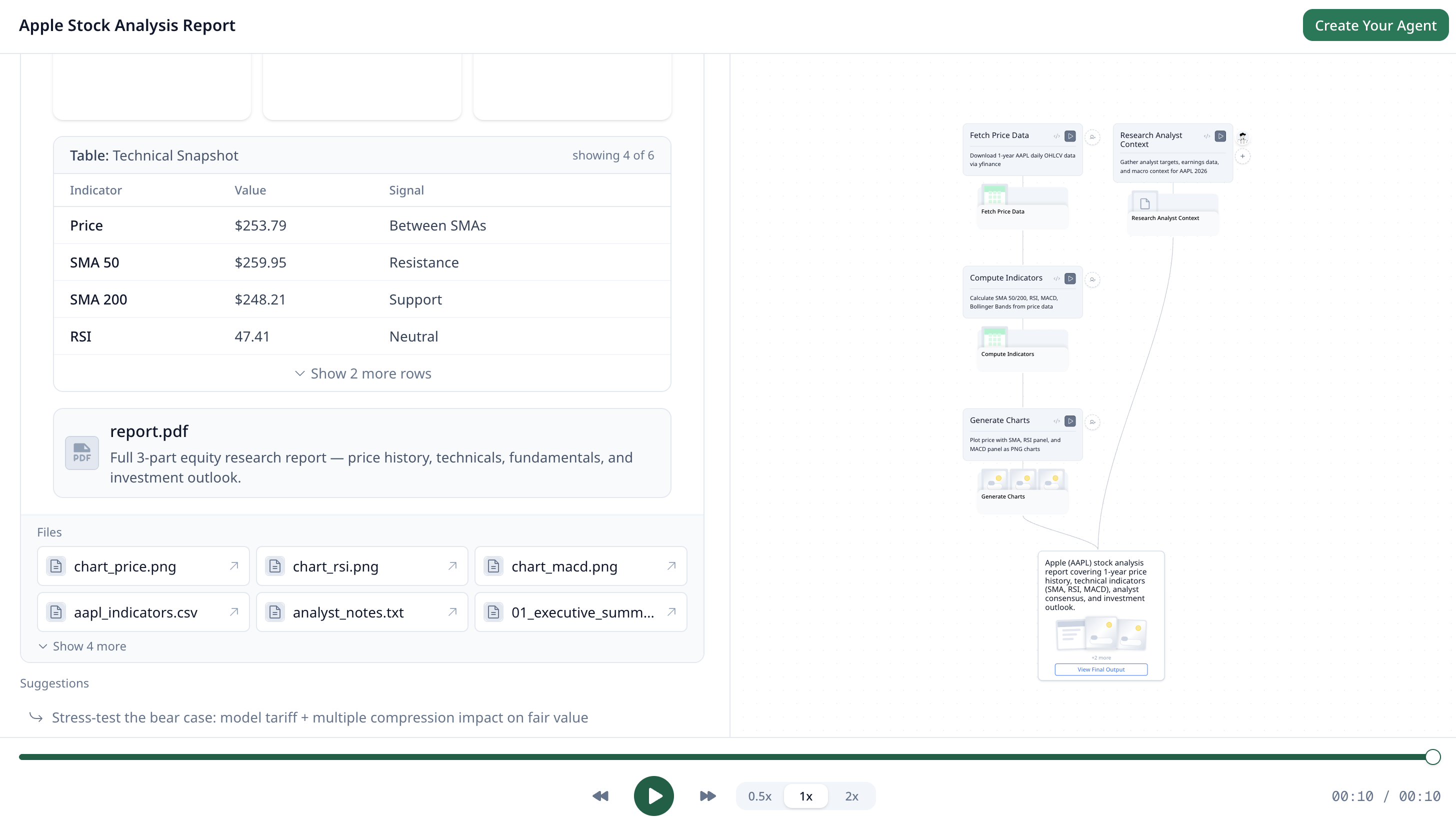
        <content type="html"><![CDATA[<p>모든 세션에 대해 <strong>리플레이 링크</strong>를 생성할 수 있습니다. 받는 사람은 <strong>로그인 없이</strong> 대화와 워크플로 실행 과정을 그대로 볼 수 있습니다 — 영상 재생을 보는 것처럼.</p>
<!-- -->
<p>협업자에게 에이전트의 추론 과정을 공유하거나, 워크플로를 시연하거나, 분석 실행 중 무엇이 있었는지 PI에게 보여줄 때 유용합니다.</p>
<!-- -->
<img src="https://doc.morphmind.ai/ko/assets/images/session-replay-fb6ec3535acdec193490c2768a67df24.png" alt="세션 메뉴의 리플레이 링크 생성 버튼" style="max-width:480px;width:100%;border-radius:8px;border:1px solid #e2e8f0;margin-top:12px">
<img src="https://doc.morphmind.ai/ko/assets/images/session-replay-2-2f6665b715ecbf18ba49b98ced95012c.png" alt="워크플로 타임라인이 있는 리플레이 재생 화면" style="max-width:720px;width:100%;border-radius:8px;border:1px solid #e2e8f0;margin-top:12px">
<div class="theme-admonition theme-admonition-tip admonition_xJq3 alert alert--success"><div class="admonitionHeading_Gvgb"><span class="admonitionIcon_Rf37"><svg viewBox="0 0 12 16"><path fill-rule="evenodd" d="M6.5 0C3.48 0 1 2.19 1 5c0 .92.55 2.25 1 3 1.34 2.25 1.78 2.78 2 4v1h5v-1c.22-1.22.66-1.75 2-4 .45-.75 1-2.08 1-3 0-2.81-2.48-5-5.5-5zm3.64 7.48c-.25.44-.47.8-.67 1.11-.86 1.41-1.25 2.06-1.45 3.23-.02.05-.02.11-.02.17H5c0-.06 0-.13-.02-.17-.2-1.17-.59-1.83-1.45-3.23-.2-.31-.42-.67-.67-1.11C2.44 6.78 2 5.65 2 5c0-2.2 2.02-4 4.5-4 1.22 0 2.36.42 3.22 1.19C10.55 2.94 11 3.94 11 5c0 .66-.44 1.78-.86 2.48zM4 14h5c-.23 1.14-1.3 2-2.5 2s-2.27-.86-2.5-2z"></path></svg></span>팁</div><div class="admonitionContent_BuS1"><p>공유되는 것은 스냅샷입니다 — 원본 세션에는 영향이 없습니다. 공유 링크는 언제든 철회할 수 있습니다.</p></div></div>
<p><a href="https://agentlab.morphmind.ai/" target="_blank" rel="noopener noreferrer" class="">지금 사용해보기 →</a></p>]]></content>
        <category label="feature" term="feature"/>
        <category label="release-2026-04-02" term="release-2026-04-02"/>
    </entry>
    <entry>
        <title type="html"><![CDATA[Ask MM: 플랫폼을 벗어나지 않고 도움 받기]]></title>
        <id>https://doc.morphmind.ai/ko/whats-new/ask-mm</id>
        <link href="https://doc.morphmind.ai/ko/whats-new/ask-mm"/>
        <updated>2026-03-18T00:00:00.000Z</updated>
        <summary type="html"><![CDATA[시작 방법이나 AI 팀을 어떻게 운영할지 모르겠나요? 언제든지 MM에게 빠른 가이드를 요청하세요.]]></summary>
        <content type="html"><![CDATA[<p>시작 방법이나 AI 팀을 어떻게 운영할지 잘 모르시겠나요? 언제든지 플랫폼 안에서 바로 <strong>MM에게 물어보세요</strong>.</p>
<!-- -->
<p>MorphMind 사용법에 관한 어떤 질문이든 가능합니다. MM은 제품 문서와 지식을 기반으로 하므로, 답변이 정확하고 현재 위치에 맞춰 제공됩니다.</p>
<p><a class="" href="https://doc.morphmind.ai/ko/learn/advanced-features">작동 방식 알아보기 →</a></p>]]></content>
        <category label="feature" term="feature"/>
        <category label="release-2026-03-18" term="release-2026-03-18"/>
    </entry>
    <entry>
        <title type="html"><![CDATA[파일 일괄 선택 후 다운로드 또는 삭제]]></title>
        <id>https://doc.morphmind.ai/ko/whats-new/batch-select-files</id>
        <link href="https://doc.morphmind.ai/ko/whats-new/batch-select-files"/>
        <updated>2026-03-18T00:00:00.000Z</updated>
        <summary type="html"><![CDATA[여러 파일을 한 번에 선택해 다운로드하거나 삭제하세요. 더 이상 하나씩 처리할 필요가 없습니다.]]></summary>
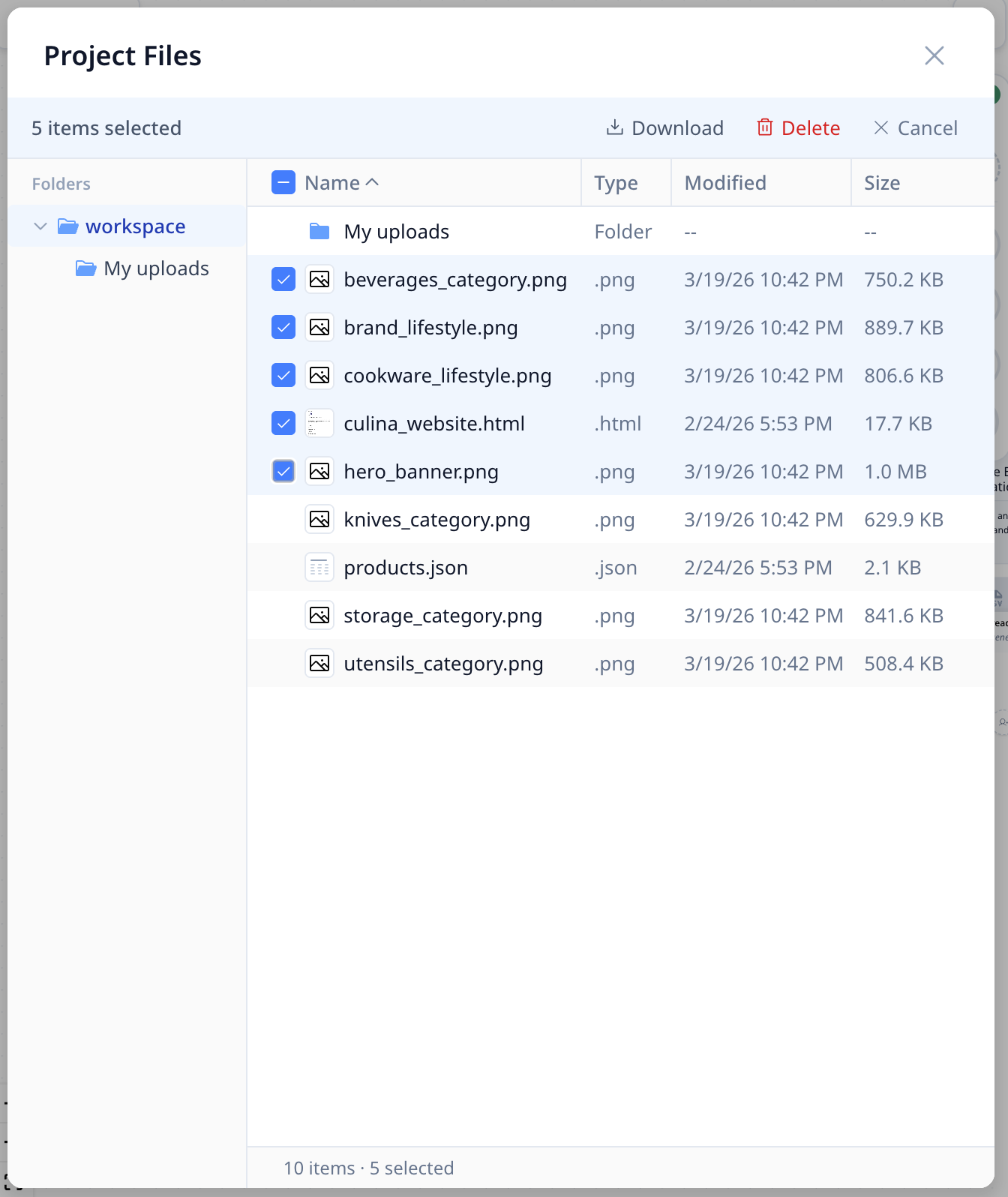
        <content type="html"><![CDATA[<p>여러 파일을 한 번에 선택해 다운로드하거나 삭제할 수 있습니다. <strong>이제 파일을 하나씩 처리하지 않아도 됩니다.</strong></p>
<!-- -->
<p>긴 세션 이후 파일을 정리하거나 생성된 결과물을 한 번에 다운로드할 때 특히 유용합니다.</p>
<!-- -->
<img src="https://doc.morphmind.ai/ko/assets/images/batch-selected-5177e6c4fb8a4d24776cb716274cc653.png" alt="다중 선택 체크박스가 있는 파일 일괄 선택" style="max-width:720px;width:100%;border-radius:8px;border:1px solid #e2e8f0;margin-top:12px">]]></content>
        <category label="improvement" term="improvement"/>
        <category label="release-2026-03-18" term="release-2026-03-18"/>
    </entry>
    <entry>
        <title type="html"><![CDATA[커뮤니티 전문가 스킬 검색 및 추가]]></title>
        <id>https://doc.morphmind.ai/ko/whats-new/community-specialist-skills</id>
        <link href="https://doc.morphmind.ai/ko/whats-new/community-specialist-skills"/>
        <updated>2026-03-18T00:00:00.000Z</updated>
        <summary type="html"><![CDATA[다른 연구자들이 만든 스킬을 둘러보고, 클릭 한 번으로 어떤 전문가에게도 추가하세요.]]></summary>
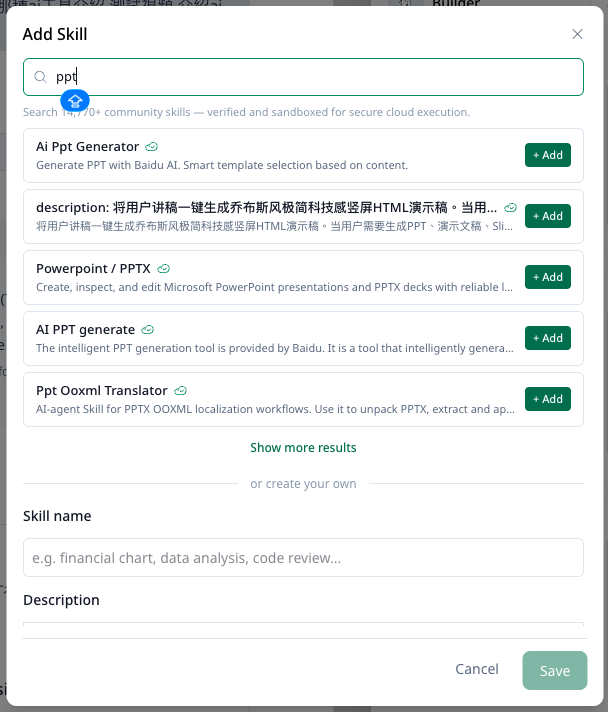
        <content type="html"><![CDATA[<p>GitHub 커뮤니티의 스킬을 둘러보고 프로젝트의 어떤 전문가에게든 바로 추가할 수 있습니다.</p>
<!-- -->
<!-- -->
<img src="https://doc.morphmind.ai/ko/assets/images/0318-whats-new-image-a2557247520925929ddffcba98e07eef.png" alt="스킬 추가 패널 — 커뮤니티에서 검색해 전문가에게 추가" style="max-width:720px;width:100%;border-radius:8px;border:1px solid #e2e8f0;margin-top:12px">
<p>스킬은 사전 구축된 기능입니다. 모든 것을 처음부터 설정할 필요 없이, 커뮤니티가 이미 만들고 검증한 기능을 바로 가져올 수 있습니다.</p>
<p><a class="" href="https://doc.morphmind.ai/ko/learn/specialist-skills">작동 방식 알아보기 →</a></p>]]></content>
        <category label="feature" term="feature"/>
        <category label="release-2026-03-18" term="release-2026-03-18"/>
    </entry>
    <entry>
        <title type="html"><![CDATA[언제든지 UI 언어 전환]]></title>
        <id>https://doc.morphmind.ai/ko/whats-new/language-switching</id>
        <link href="https://doc.morphmind.ai/ko/whats-new/language-switching"/>
        <updated>2026-03-18T00:00:00.000Z</updated>
        <summary type="html"><![CDATA[설정에서 MorphMind 인터페이스 언어를 변경하세요 — English, 简体中文, Español, 한국어 지원.]]></summary>
        <content type="html"><![CDATA[<p><strong>설정</strong>에서 언제든지 MorphMind 인터페이스 언어를 전환할 수 있습니다. English, 简体中文, Español, 한국어를 지원합니다.</p>
<!-- -->
<p>여러 지역의 팀원과 협업하거나 모국어로 작업할 때 유용합니다.</p>
<p><a href="https://agentlab.morphmind.ai/" target="_blank" rel="noopener noreferrer" class="">설정 열기 →</a></p>]]></content>
        <category label="feature" term="feature"/>
        <category label="release-2026-03-18" term="release-2026-03-18"/>
    </entry>
    <entry>
        <title type="html"><![CDATA[사전 제작된 샘플 프로젝트 사용해보기]]></title>
        <id>https://doc.morphmind.ai/ko/whats-new/sample-projects</id>
        <link href="https://doc.morphmind.ai/ko/whats-new/sample-projects"/>
        <updated>2026-03-18T00:00:00.000Z</updated>
        <summary type="html"><![CDATA[사전 제작된 프로젝트 템플릿과 미리 구성된 AI 팀으로 MorphMind를 빠르게 탐색하세요.]]></summary>
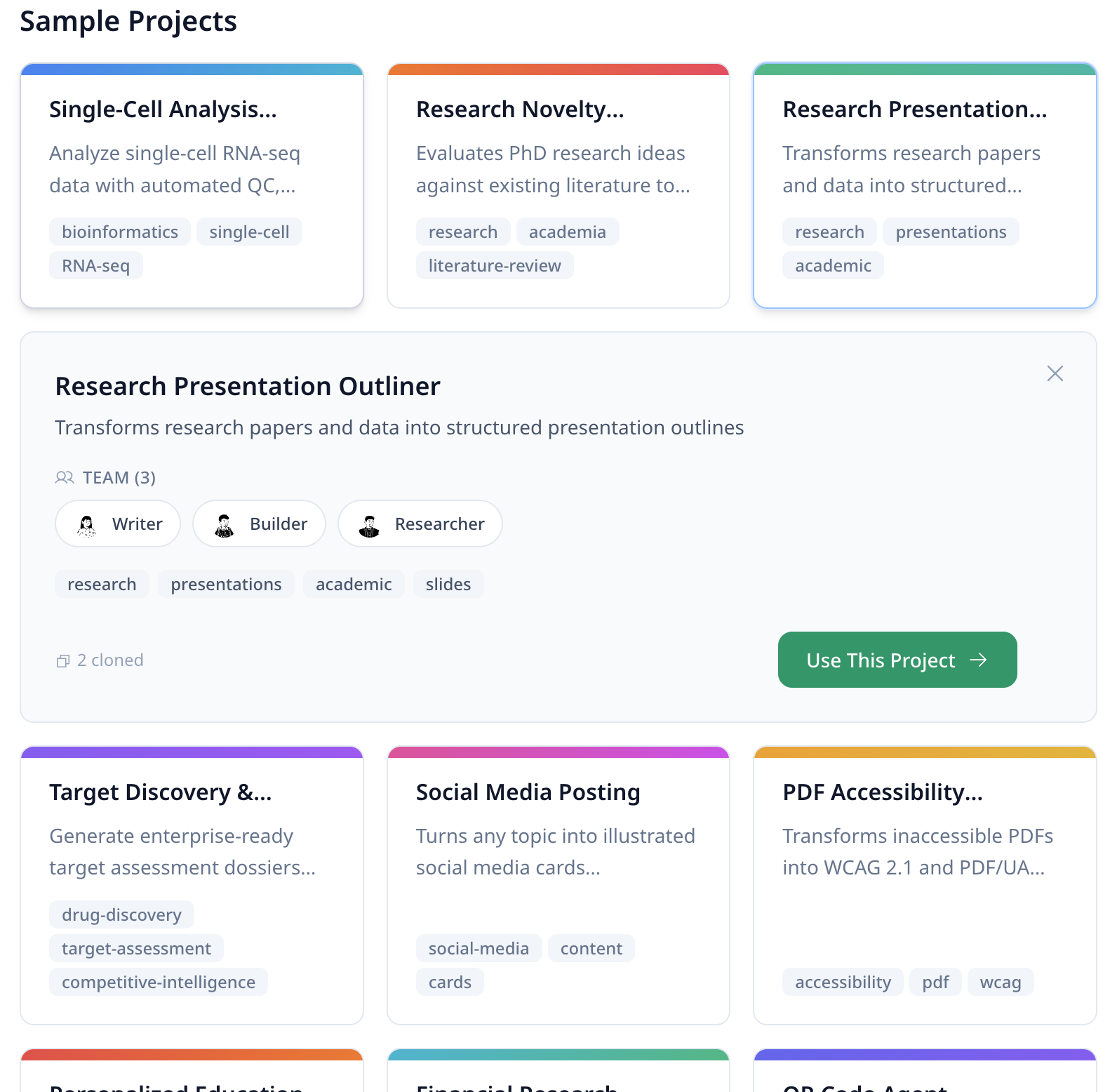
        <content type="html"><![CDATA[<p>사전 제작된 프로젝트 템플릿을 사용해 미리 구성된 AI 팀과 함께 MorphMind를 탐색해보세요.</p>
<!-- -->
<!-- -->
<img src="https://doc.morphmind.ai/ko/assets/images/sample-project-1-6bd700358f2299aae97917dc19b64497.png" alt="샘플 프로젝트" style="max-width:480px;width:100%;border-radius:8px;border:1px solid #e2e8f0;margin-top:12px">
<p>처음부터 직접 구축하기 전에, 엔드투엔드 에이전트 구성이 어떤 모습인지 빠르게 확인할 수 있는 방법입니다.</p>
<p><a href="https://agentlab.morphmind.ai/" target="_blank" rel="noopener noreferrer" class="">샘플 프로젝트 둘러보기 →</a></p>]]></content>
        <category label="feature" term="feature"/>
        <category label="release-2026-03-18" term="release-2026-03-18"/>
    </entry>
</feed>