<?xml version="1.0" encoding="utf-8"?><?xml-stylesheet type="text/xsl" href="atom.xsl"?>
<feed xmlns="http://www.w3.org/2005/Atom">
    <id>https://doc.morphmind.ai/zh-Hans/whats-new</id>
    <title>MorphMind — What's New</title>
    <updated>2026-04-16T00:00:00.000Z</updated>
    <generator>https://github.com/jpmonette/feed</generator>
    <link rel="alternate" href="https://doc.morphmind.ai/zh-Hans/whats-new"/>
    <subtitle>Latest product updates and new features</subtitle>
    <icon>https://doc.morphmind.ai/zh-Hans/img/favicon.ico</icon>
    <rights>© 2026 MorphMind</rights>
    <entry>
        <title type="html"><![CDATA[延续上下文升级]]></title>
        <id>https://doc.morphmind.ai/zh-Hans/whats-new/carry-forward-files</id>
        <link href="https://doc.morphmind.ai/zh-Hans/whats-new/carry-forward-files"/>
        <updated>2026-04-16T00:00:00.000Z</updated>
        <summary type="html"><![CDATA[上一个会话的所有文件（含智能体生成的）现在都会复制到新会话，不只是对话摘要。]]></summary>
        <content type="html"><![CDATA[<p>上次我们上线了「延续上下文」，会把对话摘要和上传的文件带到新会话。应很多用户要求，这次我们进一步把上一个会话的**所有文件（包括智能体生成的）**全部复制到新会话。</p>
<!-- -->
<!-- -->
<img src="https://doc.morphmind.ai/zh-Hans/assets/images/carry-forward-files-204c98e2e3ab0d6f8ff185f29d87d663.png" alt="新建会话弹窗，含全新开始与延续上下文选项" style="max-width:480px;width:100%;border-radius:8px;border:1px solid #e2e8f0;margin-top:12px">
<div class="theme-admonition theme-admonition-tip admonition_xJq3 alert alert--success"><div class="admonitionHeading_Gvgb"><span class="admonitionIcon_Rf37"><svg viewBox="0 0 12 16"><path fill-rule="evenodd" d="M6.5 0C3.48 0 1 2.19 1 5c0 .92.55 2.25 1 3 1.34 2.25 1.78 2.78 2 4v1h5v-1c.22-1.22.66-1.75 2-4 .45-.75 1-2.08 1-3 0-2.81-2.48-5-5.5-5zm3.64 7.48c-.25.44-.47.8-.67 1.11-.86 1.41-1.25 2.06-1.45 3.23-.02.05-.02.11-.02.17H5c0-.06 0-.13-.02-.17-.2-1.17-.59-1.83-1.45-3.23-.2-.31-.42-.67-.67-1.11C2.44 6.78 2 5.65 2 5c0-2.2 2.02-4 4.5-4 1.22 0 2.36.42 3.22 1.19C10.55 2.94 11 3.94 11 5c0 .66-.44 1.78-.86 2.48zM4 14h5c-.23 1.14-1.3 2-2.5 2s-2.27-.86-2.5-2z"></path></svg></span>提示</div><div class="admonitionContent_BuS1"><p>如果新会话的目的是开启另一项研究、实验或工作流程，还是建议选「全新开始」，保持思路清晰。</p></div></div>
<p><a href="https://agentlab.morphmind.ai/" target="_blank" rel="noopener noreferrer" class="">立即试用 →</a></p>]]></content>
        <category label="improvement" term="improvement"/>
        <category label="release-2026-04-16" term="release-2026-04-16"/>
    </entry>
    <entry>
        <title type="html"><![CDATA[桌面版（Beta）：Mac 和 Windows 端上线]]></title>
        <id>https://doc.morphmind.ai/zh-Hans/whats-new/desktop-app-beta</id>
        <link href="https://doc.morphmind.ai/zh-Hans/whats-new/desktop-app-beta"/>
        <updated>2026-04-16T00:00:00.000Z</updated>
        <summary type="html"><![CDATA[桌面客户端可以直接连接本地文件和本地算力，目前为 Beta 阶段。]]></summary>
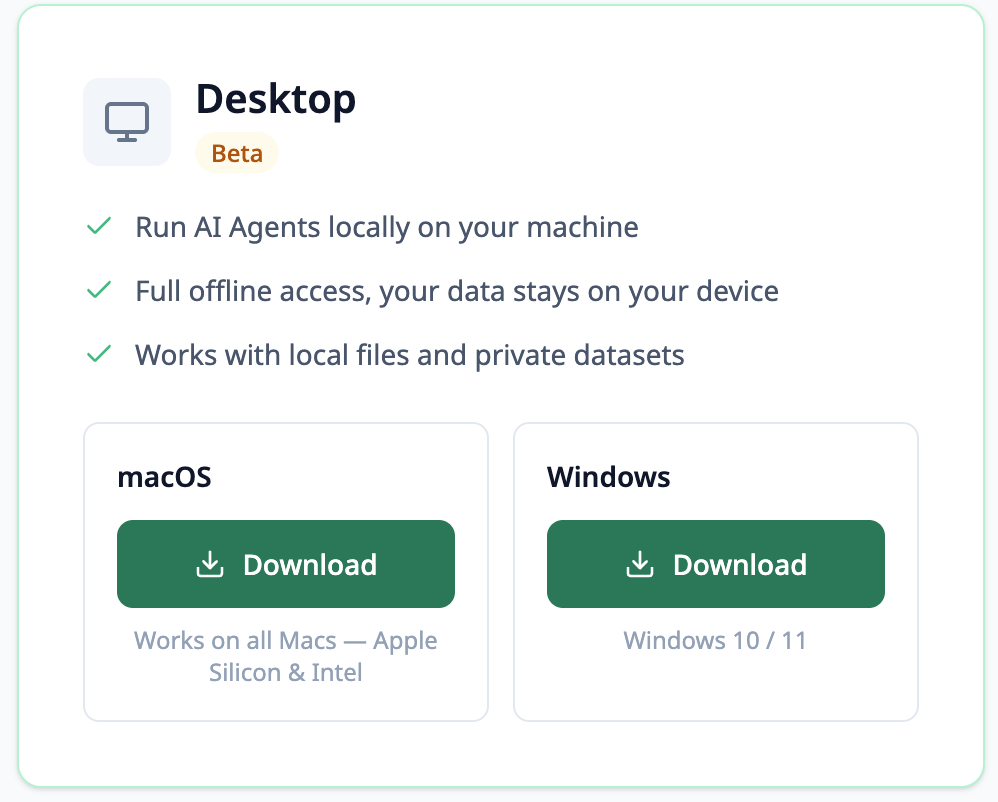
        <content type="html"><![CDATA[<p>我们推出了桌面客户端，可以直接连接本地文件和本地算力。目前还在 Beta 阶段，若干功能还在打磨中。</p>
<!-- -->
<p>下载地址：<a href="https://morphmind.cn/zh/products" target="_blank" rel="noopener noreferrer" class="">morphmind.cn/zh/products</a> 或 <a href="https://morphmind.ai/products" target="_blank" rel="noopener noreferrer" class="">morphmind.ai/products</a>。</p>
<!-- -->
<img src="https://doc.morphmind.ai/zh-Hans/assets/images/desktop-app-cc1b602b5f5ce38a45c7aa6543b35cfd.png" alt="桌面版 macOS 与 Windows 下载选项" style="max-width:480px;width:100%;border-radius:8px;border:1px solid #e2e8f0;margin-top:12px">
<div class="theme-admonition theme-admonition-tip admonition_xJq3 alert alert--success"><div class="admonitionHeading_Gvgb"><span class="admonitionIcon_Rf37"><svg viewBox="0 0 12 16"><path fill-rule="evenodd" d="M6.5 0C3.48 0 1 2.19 1 5c0 .92.55 2.25 1 3 1.34 2.25 1.78 2.78 2 4v1h5v-1c.22-1.22.66-1.75 2-4 .45-.75 1-2.08 1-3 0-2.81-2.48-5-5.5-5zm3.64 7.48c-.25.44-.47.8-.67 1.11-.86 1.41-1.25 2.06-1.45 3.23-.02.05-.02.11-.02.17H5c0-.06 0-.13-.02-.17-.2-1.17-.59-1.83-1.45-3.23-.2-.31-.42-.67-.67-1.11C2.44 6.78 2 5.65 2 5c0-2.2 2.02-4 4.5-4 1.22 0 2.36.42 3.22 1.19C10.55 2.94 11 3.94 11 5c0 .66-.44 1.78-.86 2.48zM4 14h5c-.23 1.14-1.3 2-2.5 2s-2.27-.86-2.5-2z"></path></svg></span>提示</div><div class="admonitionContent_BuS1"><p>什么时候用哪种模式？</p><ul>
<li class=""><strong>云端模式</strong> — 适合轻量任务、多设备切换、沙盒环境下快速试验</li>
<li class=""><strong>本地模式</strong> — 适合大数据集、本地文件、浏览器自动化、本地 CPU/GPU 算力密集的任务</li>
</ul></div></div>
<p><a href="https://morphmind.cn/zh/products" target="_blank" rel="noopener noreferrer" class="">获取桌面版 →</a></p>]]></content>
        <category label="feature" term="feature"/>
        <category label="release-2026-04-16" term="release-2026-04-16"/>
    </entry>
    <entry>
        <title type="html"><![CDATA[MM 助手：两个新按钮]]></title>
        <id>https://doc.morphmind.ai/zh-Hans/whats-new/mm-assistant-helpers</id>
        <link href="https://doc.morphmind.ai/zh-Hans/whats-new/mm-assistant-helpers"/>
        <updated>2026-04-16T00:00:00.000Z</updated>
        <summary type="html"><![CDATA[和 MM 助手聊天时新增两个按钮——查看会话 MM 豆消耗、获取个性化沟通建议。]]></summary>
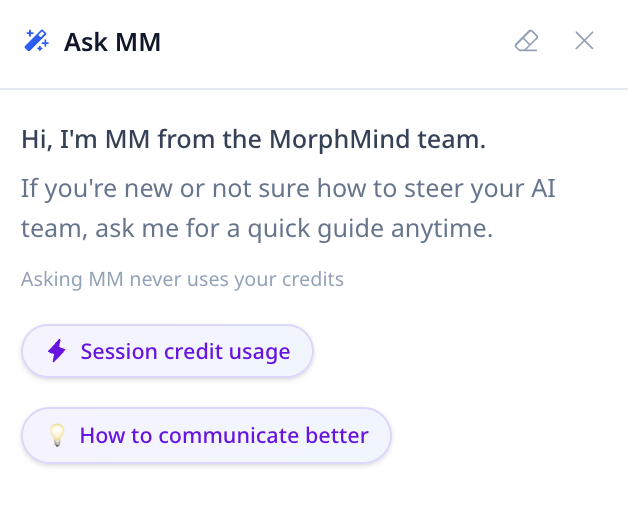
        <content type="html"><![CDATA[<p>和 MM 助手聊天时，现在会看到两个新按钮，用于查看当前会话消耗了多少 MM 豆，以及基于最近和 AI 的互动，给出个性化的沟通建议。</p>
<!-- -->
<!-- -->
<img src="https://doc.morphmind.ai/zh-Hans/assets/images/mm-assistant-0431fd58aeff73c0a6c667b6bcbcac17.png" alt="MM 助手聊天面板，含会话 MM 豆消耗与沟通建议两个按钮" style="max-width:480px;width:100%;border-radius:8px;border:1px solid #e2e8f0;margin-top:12px">
<div class="theme-admonition theme-admonition-tip admonition_xJq3 alert alert--success"><div class="admonitionHeading_Gvgb"><span class="admonitionIcon_Rf37"><svg viewBox="0 0 12 16"><path fill-rule="evenodd" d="M6.5 0C3.48 0 1 2.19 1 5c0 .92.55 2.25 1 3 1.34 2.25 1.78 2.78 2 4v1h5v-1c.22-1.22.66-1.75 2-4 .45-.75 1-2.08 1-3 0-2.81-2.48-5-5.5-5zm3.64 7.48c-.25.44-.47.8-.67 1.11-.86 1.41-1.25 2.06-1.45 3.23-.02.05-.02.11-.02.17H5c0-.06 0-.13-.02-.17-.2-1.17-.59-1.83-1.45-3.23-.2-.31-.42-.67-.67-1.11C2.44 6.78 2 5.65 2 5c0-2.2 2.02-4 4.5-4 1.22 0 2.36.42 3.22 1.19C10.55 2.94 11 3.94 11 5c0 .66-.44 1.78-.86 2.48zM4 14h5c-.23 1.14-1.3 2-2.5 2s-2.27-.86-2.5-2z"></path></svg></span>提示</div><div class="admonitionContent_BuS1"><p>使用 MM 助手不消耗任何 MM 豆。</p></div></div>
<p><a href="https://agentlab.morphmind.ai/" target="_blank" rel="noopener noreferrer" class="">立即试用 →</a></p>]]></content>
        <category label="feature" term="feature"/>
        <category label="release-2026-04-16" term="release-2026-04-16"/>
    </entry>
    <entry>
        <title type="html"><![CDATA[我的团队]]></title>
        <id>https://doc.morphmind.ai/zh-Hans/whats-new/my-team</id>
        <link href="https://doc.morphmind.ai/zh-Hans/whats-new/my-team"/>
        <updated>2026-04-16T00:00:00.000Z</updated>
        <summary type="html"><![CDATA[左侧栏新增「我的团队」板块，在一个视图里管理你所有的 AI 专家。]]></summary>
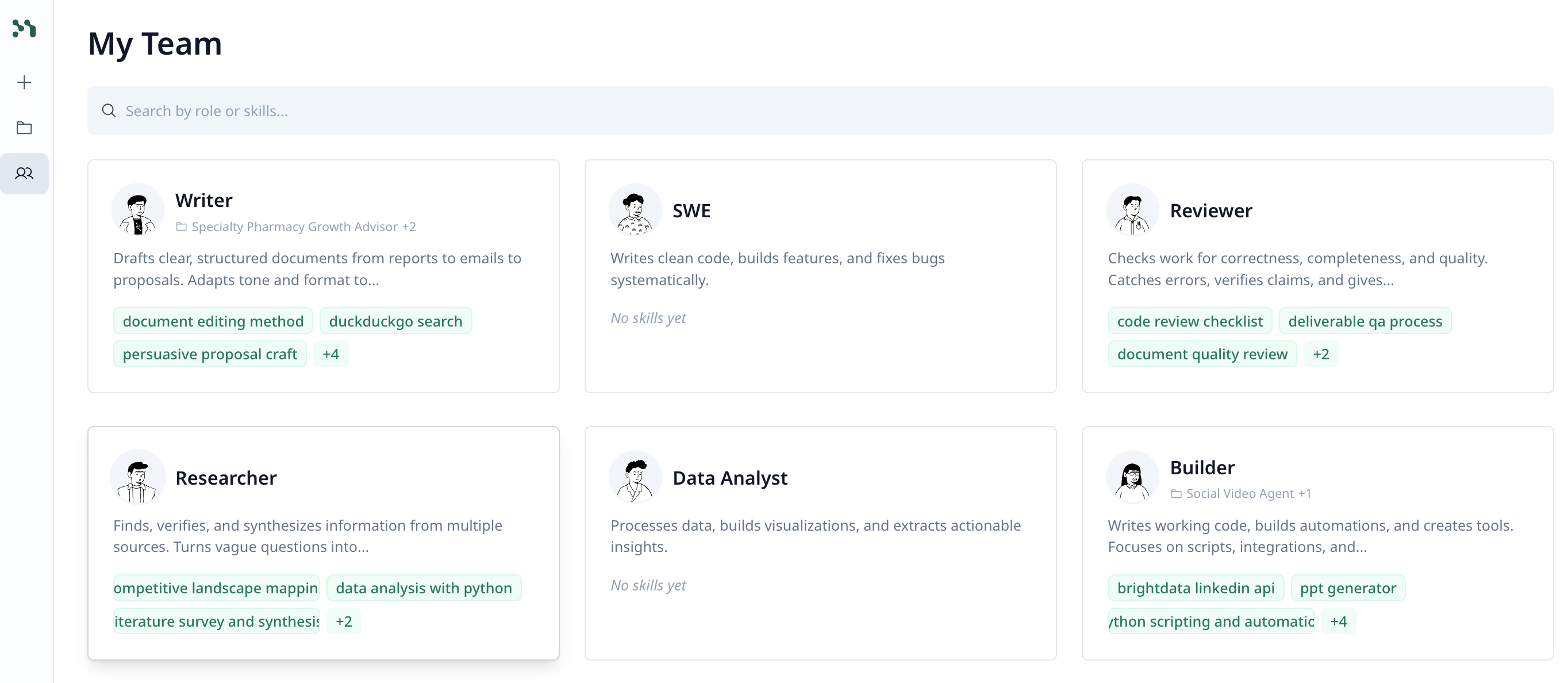
        <content type="html"><![CDATA[<p>左侧栏新增了「<strong>我的团队</strong>」板块，你可以在一个视图里看到所有 AI 专家，统一管理他们的技能、记忆，查看分配情况，不用再逐个智能体翻找。</p>
<!-- -->
<!-- -->
<img src="https://doc.morphmind.ai/zh-Hans/assets/images/my-team-1c2a408c685edcd3ccc981bb43b5a33e.png" alt="我的团队页面：列出所有 AI 专家及其角色与技能" style="max-width:720px;width:100%;border-radius:8px;border:1px solid #e2e8f0;margin-top:12px">
<div class="theme-admonition theme-admonition-tip admonition_xJq3 alert alert--success"><div class="admonitionHeading_Gvgb"><span class="admonitionIcon_Rf37"><svg viewBox="0 0 12 16"><path fill-rule="evenodd" d="M6.5 0C3.48 0 1 2.19 1 5c0 .92.55 2.25 1 3 1.34 2.25 1.78 2.78 2 4v1h5v-1c.22-1.22.66-1.75 2-4 .45-.75 1-2.08 1-3 0-2.81-2.48-5-5.5-5zm3.64 7.48c-.25.44-.47.8-.67 1.11-.86 1.41-1.25 2.06-1.45 3.23-.02.05-.02.11-.02.17H5c0-.06 0-.13-.02-.17-.2-1.17-.59-1.83-1.45-3.23-.2-.31-.42-.67-.67-1.11C2.44 6.78 2 5.65 2 5c0-2.2 2.02-4 4.5-4 1.22 0 2.36.42 3.22 1.19C10.55 2.94 11 3.94 11 5c0 .66-.44 1.78-.86 2.48zM4 14h5c-.23 1.14-1.3 2-2.5 2s-2.27-.86-2.5-2z"></path></svg></span>提示</div><div class="admonitionContent_BuS1"><p>专家会在你创建的每一个项目之间携带自己的技能、记忆和经验。</p></div></div>
<p><a href="https://agentlab.morphmind.ai/" target="_blank" rel="noopener noreferrer" class="">打开我的团队 →</a></p>]]></content>
        <category label="feature" term="feature"/>
        <category label="release-2026-04-16" term="release-2026-04-16"/>
    </entry>
    <entry>
        <title type="html"><![CDATA[万物互联：接入任何第三方服务或 API]]></title>
        <id>https://doc.morphmind.ai/zh-Hans/whats-new/universal-connect</id>
        <link href="https://doc.morphmind.ai/zh-Hans/whats-new/universal-connect"/>
        <updated>2026-04-16T00:00:00.000Z</updated>
        <summary type="html"><![CDATA[智能体可以连接几乎任何外部服务、API 或硬件——你提供的所有凭证都安全地存储在你的账户下。]]></summary>
        <content type="html"><![CDATA[<p>你的智能体可以连接几乎任何外部服务。有时候智能体会自己意识到需要某个密钥并主动问你；有时候你也可以主动出手，告诉它用哪个服务、把 API 密钥交给它。无论哪种方式，你提供的所有凭证都会安全地存储在你的账户下。</p>
<!-- -->
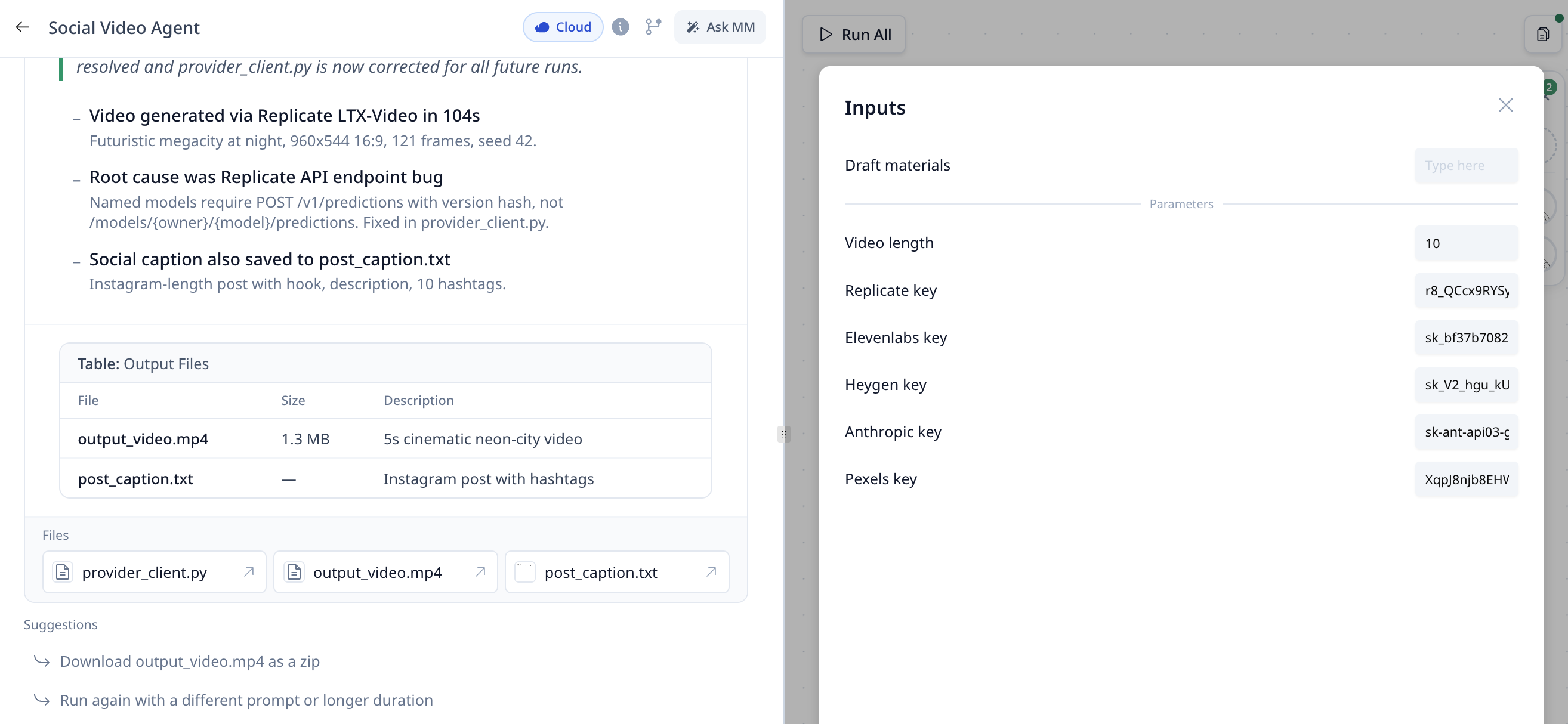
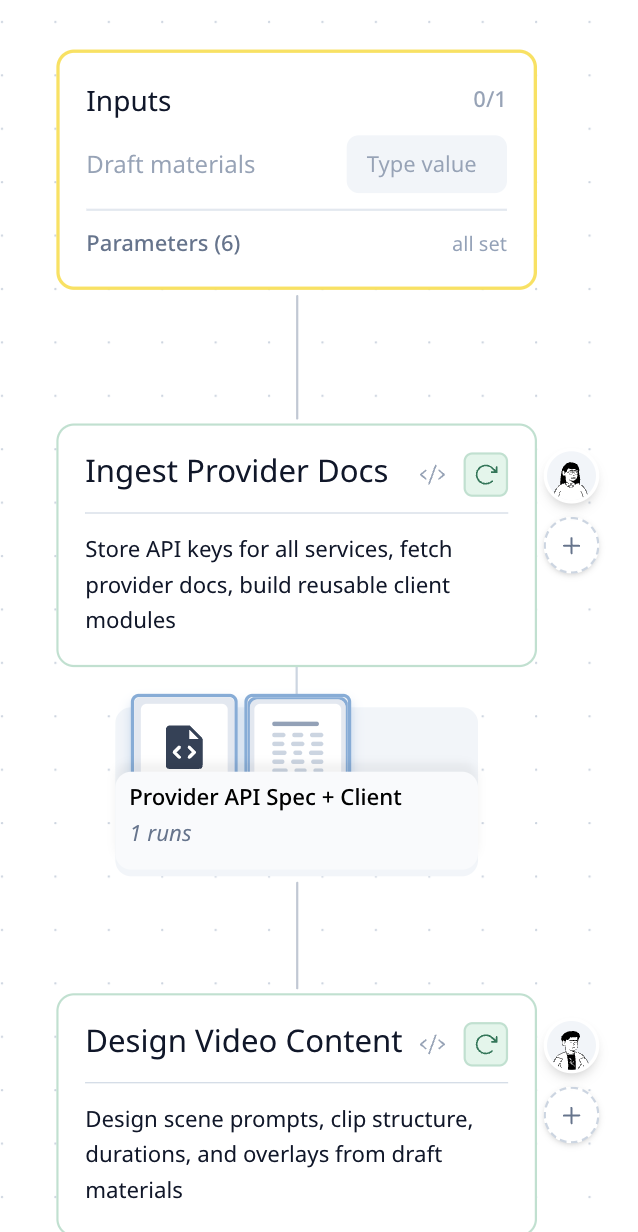
<p>下图的「社媒视频智能体」同时接入了五个服务——Replicate 生成视频、ElevenLabs 合成语音、Heygen 生成数字人、Anthropic 负责写作、Pexels 提供素材。你只需要在输入面板里填一次密钥（图 1），智能体就会把它们存入一个可复用的客户端模块，让后续每一步都能调用（图 2）。</p>
<!-- -->
<img src="https://doc.morphmind.ai/zh-Hans/assets/images/universal-connect-9ce6470fe9f685d7cad0699bcc7765e2.png" alt="社媒视频智能体的输入面板，含 Replicate、ElevenLabs、Heygen、Anthropic 与 Pexels 的密钥" style="max-width:720px;width:100%;border-radius:8px;border:1px solid #e2e8f0;margin-top:12px">
<img src="https://doc.morphmind.ai/zh-Hans/assets/images/universal-connect-workflow-b97ce58cb3e75873221159d6bc01ced2.png" alt="工作流：API 密钥透过共享的客户端模块在后续步骤中复用" style="max-width:480px;width:100%;border-radius:8px;border:1px solid #e2e8f0;margin-top:12px">
<p>不止软件服务——你的智能体同样可以连接物理机器人和硬件，只要对方有 API 接口就行。</p>
<div class="theme-admonition theme-admonition-tip admonition_xJq3 alert alert--success"><div class="admonitionHeading_Gvgb"><span class="admonitionIcon_Rf37"><svg viewBox="0 0 12 16"><path fill-rule="evenodd" d="M6.5 0C3.48 0 1 2.19 1 5c0 .92.55 2.25 1 3 1.34 2.25 1.78 2.78 2 4v1h5v-1c.22-1.22.66-1.75 2-4 .45-.75 1-2.08 1-3 0-2.81-2.48-5-5.5-5zm3.64 7.48c-.25.44-.47.8-.67 1.11-.86 1.41-1.25 2.06-1.45 3.23-.02.05-.02.11-.02.17H5c0-.06 0-.13-.02-.17-.2-1.17-.59-1.83-1.45-3.23-.2-.31-.42-.67-.67-1.11C2.44 6.78 2 5.65 2 5c0-2.2 2.02-4 4.5-4 1.22 0 2.36.42 3.22 1.19C10.55 2.94 11 3.94 11 5c0 .66-.44 1.78-.86 2.48zM4 14h5c-.23 1.14-1.3 2-2.5 2s-2.27-.86-2.5-2z"></path></svg></span>提示</div><div class="admonitionContent_BuS1"><p>密钥只需在输入面板里填一次，整个工作流都能复用，无需在每一步重新输入。</p></div></div>
<p><a href="https://agentlab.morphmind.ai/" target="_blank" rel="noopener noreferrer" class="">立即试用 →</a></p>]]></content>
        <category label="feature" term="feature"/>
        <category label="release-2026-04-16" term="release-2026-04-16"/>
    </entry>
    <entry>
        <title type="html"><![CDATA[每天送 500 个 MM 豆]]></title>
        <id>https://doc.morphmind.ai/zh-Hans/whats-new/daily-mm-beans</id>
        <link href="https://doc.morphmind.ai/zh-Hans/whats-new/daily-mm-beans"/>
        <updated>2026-04-02T00:00:00.000Z</updated>
        <summary type="html"><![CDATA[所有用户每天自动获得 500 个 MM 豆，每日重置。]]></summary>
        <content type="html"><![CDATA[<p>所有用户每天自动获得 <strong>500 个 MM 豆</strong>，每日重置。</p>
<!-- -->
<!-- -->
<img src="https://doc.morphmind.ai/zh-Hans/assets/images/daily-free-credits-referral-rewards-c3e3705ccb34856d25997c05bbf65656.png" alt="每日免费 MM 豆与邀请奖励面板" style="max-width:720px;width:100%;border-radius:8px;border:1px solid #e2e8f0;margin-top:12px">
<div class="theme-admonition theme-admonition-tip admonition_xJq3 alert alert--success"><div class="admonitionHeading_Gvgb"><span class="admonitionIcon_Rf37"><svg viewBox="0 0 12 16"><path fill-rule="evenodd" d="M6.5 0C3.48 0 1 2.19 1 5c0 .92.55 2.25 1 3 1.34 2.25 1.78 2.78 2 4v1h5v-1c.22-1.22.66-1.75 2-4 .45-.75 1-2.08 1-3 0-2.81-2.48-5-5.5-5zm3.64 7.48c-.25.44-.47.8-.67 1.11-.86 1.41-1.25 2.06-1.45 3.23-.02.05-.02.11-.02.17H5c0-.06 0-.13-.02-.17-.2-1.17-.59-1.83-1.45-3.23-.2-.31-.42-.67-.67-1.11C2.44 6.78 2 5.65 2 5c0-2.2 2.02-4 4.5-4 1.22 0 2.36.42 3.22 1.19C10.55 2.94 11 3.94 11 5c0 .66-.44 1.78-.86 2.48zM4 14h5c-.23 1.14-1.3 2-2.5 2s-2.27-.86-2.5-2z"></path></svg></span>提示</div><div class="admonitionContent_BuS1"><p>积分消耗顺序为：每日免费 → 每月额度 → 奖励积分 → 按需购买的积分。这样可以优先用完"会过期"的额度。</p></div></div>
<p><a href="https://agentlab.morphmind.ai/" target="_blank" rel="noopener noreferrer" class="">查看您的余额 →</a></p>]]></content>
        <category label="feature" term="feature"/>
        <category label="release-2026-04-02" term="release-2026-04-02"/>
    </entry>
    <entry>
        <title type="html"><![CDATA[公式渲染]]></title>
        <id>https://doc.morphmind.ai/zh-Hans/whats-new/formula-rendering</id>
        <link href="https://doc.morphmind.ai/zh-Hans/whats-new/formula-rendering"/>
        <updated>2026-04-02T00:00:00.000Z</updated>
        <summary type="html"><![CDATA[AI 输出中的下标、上标、希腊字母与科学符号现在能正确渲染，不再以原始文本显示。]]></summary>
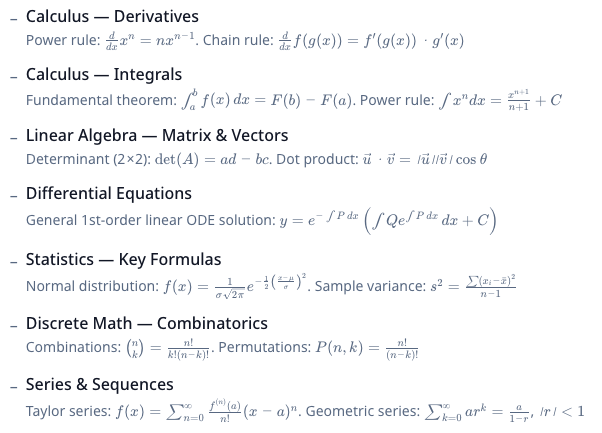
        <content type="html"><![CDATA[<p>AI 输出中的数学公式和科学符号（如下标、上标、希腊字母）现在会正确渲染，而不是显示原始文本。</p>
<!-- -->
<!-- -->
<img src="https://doc.morphmind.ai/zh-Hans/assets/images/formula-rendering-6dbd153c8b98db8d1894db6b8dae9afb.png" alt="公式渲染示例" style="max-width:720px;width:100%;border-radius:8px;border:1px solid #e2e8f0;margin-top:12px">
<p><a href="https://agentlab.morphmind.ai/" target="_blank" rel="noopener noreferrer" class="">查看实际效果 →</a></p>]]></content>
        <category label="fix" term="fix"/>
        <category label="release-2026-04-02" term="release-2026-04-02"/>
    </entry>
    <entry>
        <title type="html"><![CDATA[长文档分段生成]]></title>
        <id>https://doc.morphmind.ai/zh-Hans/whats-new/long-document-generation</id>
        <link href="https://doc.morphmind.ai/zh-Hans/whats-new/long-document-generation"/>
        <updated>2026-04-02T00:00:00.000Z</updated>
        <summary type="html"><![CDATA[撰写报告、论文或长文档时，系统自动拆分为章节逐步生成，每完成一章立即出现在项目文件中。]]></summary>
        <content type="html"><![CDATA[<p>针对大家反馈的"长时间写作容易超时"、"中间看不到进度"、"不确定是否还在运行"等问题，我们对写作流程做了优化。</p>
<!-- -->
<p>撰写报告、论文或长文档时，系统会自动将任务拆分为多个章节逐步生成，例如：<code>01_引言.md</code>、<code>02_数据分析.md</code>、<code>03_结论.md</code>。</p>
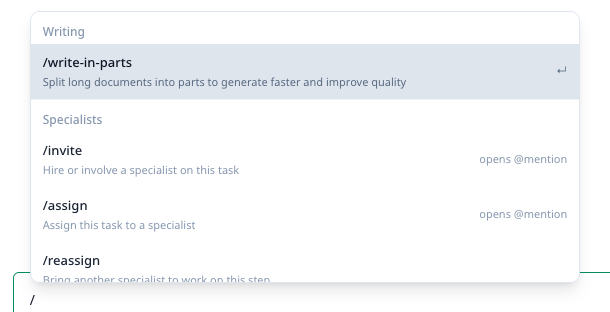
<p>每完成一个章节，结果会立即出现在项目文件中，可以边生成边查看、边调整方向，而不需要等待全部完成后才看到结果。您现在也可以在对话框中输入 <code>/write-in-parts</code>（分段撰写）来手动触发此模式。</p>
<p>希望这种方式带来几个明显改进：</p>
<ul>
<li class="">每一段写作控制在较短时间内完成，避免长时间运行导致中断</li>
<li class="">可以随时看到当前进度，明确"已经完成到哪一步"</li>
<li class="">支持在中途调整内容，而不是等几小时后再重来</li>
<li class="">最终所有章节会自动合并为完整文档，并转换为需要的格式（PDF / DOCX 等）</li>
</ul>
<!-- -->
<img src="https://doc.morphmind.ai/zh-Hans/assets/images/long-document-generation-19f6c84406ea1a0a9df54cbfc7af82a7.png" alt="项目文件面板中按章节拆分的长文档" style="max-width:720px;width:100%;border-radius:8px;border:1px solid #e2e8f0;margin-top:12px">
<div class="theme-admonition theme-admonition-tip admonition_xJq3 alert alert--success"><div class="admonitionHeading_Gvgb"><span class="admonitionIcon_Rf37"><svg viewBox="0 0 12 16"><path fill-rule="evenodd" d="M6.5 0C3.48 0 1 2.19 1 5c0 .92.55 2.25 1 3 1.34 2.25 1.78 2.78 2 4v1h5v-1c.22-1.22.66-1.75 2-4 .45-.75 1-2.08 1-3 0-2.81-2.48-5-5.5-5zm3.64 7.48c-.25.44-.47.8-.67 1.11-.86 1.41-1.25 2.06-1.45 3.23-.02.05-.02.11-.02.17H5c0-.06 0-.13-.02-.17-.2-1.17-.59-1.83-1.45-3.23-.2-.31-.42-.67-.67-1.11C2.44 6.78 2 5.65 2 5c0-2.2 2.02-4 4.5-4 1.22 0 2.36.42 3.22 1.19C10.55 2.94 11 3.94 11 5c0 .66-.44 1.78-.86 2.48zM4 14h5c-.23 1.14-1.3 2-2.5 2s-2.27-.86-2.5-2z"></path></svg></span>提示</div><div class="admonitionContent_BuS1"><p>在项目文件面板中可以实时看到每个章节的生成进度。</p></div></div>
<p><a href="https://agentlab.morphmind.ai/" target="_blank" rel="noopener noreferrer" class="">立即试用 →</a></p>]]></content>
        <category label="feature" term="feature"/>
        <category label="release-2026-04-02" term="release-2026-04-02"/>
    </entry>
    <entry>
        <title type="html"><![CDATA[模型切换]]></title>
        <id>https://doc.morphmind.ai/zh-Hans/whats-new/model-switching</id>
        <link href="https://doc.morphmind.ai/zh-Hans/whats-new/model-switching"/>
        <updated>2026-04-02T00:00:00.000Z</updated>
        <summary type="html"><![CDATA[在账户设置中选择不同的基础模型——MorphMind、Claude、DeepSeek、GPT-4.1、Kimi、MiniMax。]]></summary>
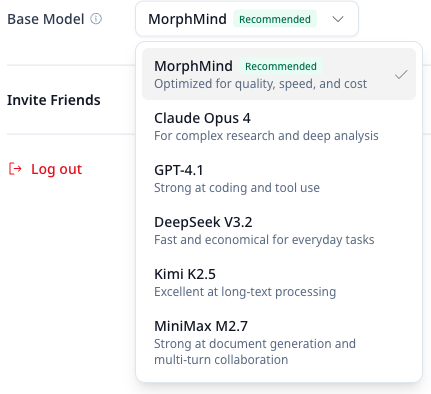
        <content type="html"><![CDATA[<p>您现在可以在账户设置中选择不同的基础模型，包括：MorphMind（默认）、Claude Opus 4.6、DeepSeek V3、GPT-4.1、Kimi K2.5、MiniMax M2.7。</p>
<!-- -->
<!-- -->
<img src="https://doc.morphmind.ai/zh-Hans/assets/images/model-switching-39bb955af7f44586629e94531fabf66c.png" alt="账户设置中的模型选择器" style="max-width:480px;width:100%;border-radius:8px;border:1px solid #e2e8f0;margin-top:12px">
<div class="theme-admonition theme-admonition-tip admonition_xJq3 alert alert--success"><div class="admonitionHeading_Gvgb"><span class="admonitionIcon_Rf37"><svg viewBox="0 0 12 16"><path fill-rule="evenodd" d="M6.5 0C3.48 0 1 2.19 1 5c0 .92.55 2.25 1 3 1.34 2.25 1.78 2.78 2 4v1h5v-1c.22-1.22.66-1.75 2-4 .45-.75 1-2.08 1-3 0-2.81-2.48-5-5.5-5zm3.64 7.48c-.25.44-.47.8-.67 1.11-.86 1.41-1.25 2.06-1.45 3.23-.02.05-.02.11-.02.17H5c0-.06 0-.13-.02-.17-.2-1.17-.59-1.83-1.45-3.23-.2-.31-.42-.67-.67-1.11C2.44 6.78 2 5.65 2 5c0-2.2 2.02-4 4.5-4 1.22 0 2.36.42 3.22 1.19C10.55 2.94 11 3.94 11 5c0 .66-.44 1.78-.86 2.48zM4 14h5c-.23 1.14-1.3 2-2.5 2s-2.27-.86-2.5-2z"></path></svg></span>提示</div><div class="admonitionContent_BuS1"><p>切换后在下次新建会话时生效。模型切换不影响工作流、专家知识和已有技能。</p></div></div>
<p><a href="https://agentlab.morphmind.ai/" target="_blank" rel="noopener noreferrer" class="">打开账户设置 →</a></p>]]></content>
        <category label="feature" term="feature"/>
        <category label="release-2026-04-02" term="release-2026-04-02"/>
    </entry>
    <entry>
        <title type="html"><![CDATA[新建会话：全新开始 / 延续上下文]]></title>
        <id>https://doc.morphmind.ai/zh-Hans/whats-new/new-session-modes</id>
        <link href="https://doc.morphmind.ai/zh-Hans/whats-new/new-session-modes"/>
        <updated>2026-04-02T00:00:00.000Z</updated>
        <summary type="html"><![CDATA[在同一智能体下开启新会话时，选择保留现状还是延续上下文。]]></summary>
        <content type="html"><![CDATA[<p>很多用户问过：智能体、会话、项目是什么关系？简单来说：</p>
<!-- -->
<blockquote>
<p><strong>1 个智能体 = 1 个 AI 团队</strong>，包括工作流、专家、技能、记忆——这些都属于智能体，永远不会丢。</p>
<p><strong>会话</strong> = 一次具体的任务，聊天记录和文件都在这个任务里。</p>
</blockquote>
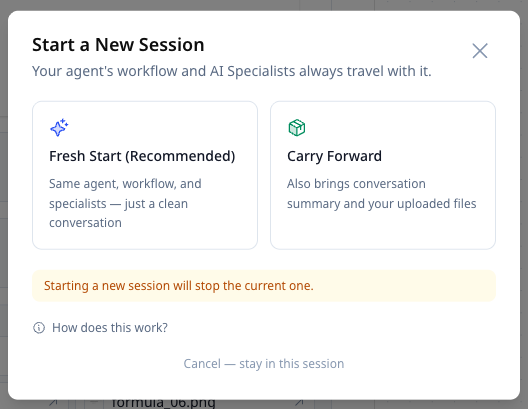
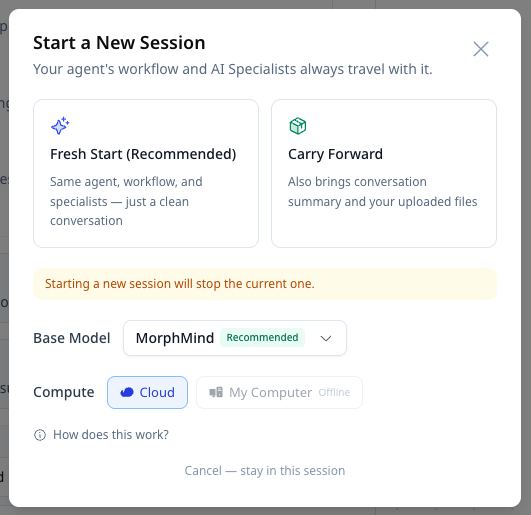
<p>之前在同一个智能体下开新会话时，聊天记录和文件留在了旧会话里。现在新建会话时，您可以选择：</p>
<ul>
<li class=""><strong>全新开始（Fresh Start）</strong> — 保留同一智能体和专家，聊天记录和文件留在当前会话</li>
<li class=""><strong>延续上下文（Carry Forward）</strong> — 总结本次对话要点，并将您上传的文件带到新会话</li>
</ul>
<!-- -->
<img src="https://doc.morphmind.ai/zh-Hans/assets/images/new-session-fresh-start-4d2727719a5f9329ebb691778814121d.png" alt="新建会话弹窗，含全新开始与延续上下文选项" style="max-width:480px;width:100%;border-radius:8px;border:1px solid #e2e8f0;margin-top:12px">
<div class="theme-admonition theme-admonition-tip admonition_xJq3 alert alert--success"><div class="admonitionHeading_Gvgb"><span class="admonitionIcon_Rf37"><svg viewBox="0 0 12 16"><path fill-rule="evenodd" d="M6.5 0C3.48 0 1 2.19 1 5c0 .92.55 2.25 1 3 1.34 2.25 1.78 2.78 2 4v1h5v-1c.22-1.22.66-1.75 2-4 .45-.75 1-2.08 1-3 0-2.81-2.48-5-5.5-5zm3.64 7.48c-.25.44-.47.8-.67 1.11-.86 1.41-1.25 2.06-1.45 3.23-.02.05-.02.11-.02.17H5c0-.06 0-.13-.02-.17-.2-1.17-.59-1.83-1.45-3.23-.2-.31-.42-.67-.67-1.11C2.44 6.78 2 5.65 2 5c0-2.2 2.02-4 4.5-4 1.22 0 2.36.42 3.22 1.19C10.55 2.94 11 3.94 11 5c0 .66-.44 1.78-.86 2.48zM4 14h5c-.23 1.14-1.3 2-2.5 2s-2.27-.86-2.5-2z"></path></svg></span>提示</div><div class="admonitionContent_BuS1"><p>同一时间只能运行一个会话，这让智能体保持专注，避免不同对话之间的串扰。随时可以切换回历史会话查看之前的工作成果。</p></div></div>
<p><a href="https://agentlab.morphmind.ai/" target="_blank" rel="noopener noreferrer" class="">立即试用 →</a></p>]]></content>
        <category label="feature" term="feature"/>
        <category label="release-2026-04-02" term="release-2026-04-02"/>
    </entry>
    <entry>
        <title type="html"><![CDATA[邀请返 1,000 个 MM 豆]]></title>
        <id>https://doc.morphmind.ai/zh-Hans/whats-new/referral-rewards</id>
        <link href="https://doc.morphmind.ai/zh-Hans/whats-new/referral-rewards"/>
        <updated>2026-04-02T00:00:00.000Z</updated>
        <summary type="html"><![CDATA[朋友通过您的邀请码注册并正常使用达标后，双方各获得 1,000 个 MM 豆奖励。]]></summary>
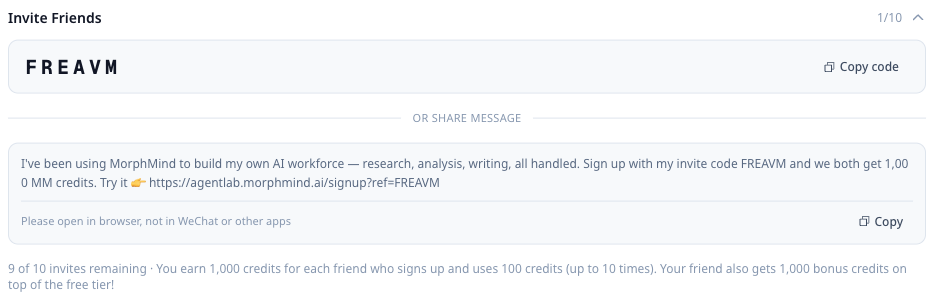
        <content type="html"><![CDATA[<p>如果您觉得 MorphMind 有帮助，欢迎通过邀请码分享给朋友。朋友注册并正常使用达标后，<strong>双方各获得 1,000 个 MM 豆奖励</strong>。</p>
<!-- -->
<p>我们也在思考如何在控制成本的同时让更多人用到 MorphMind。如果您有好的想法——比如推荐平时关注的 AI 工具、工作流博主（X / YouTube / 小红书等），或者分享您产生的有意思的案例让我们推荐给更多用户——非常欢迎通过"发送反馈"告诉我们。您比我们更了解自己的圈子。</p>
<div class="theme-admonition theme-admonition-tip admonition_xJq3 alert alert--success"><div class="admonitionHeading_Gvgb"><span class="admonitionIcon_Rf37"><svg viewBox="0 0 12 16"><path fill-rule="evenodd" d="M6.5 0C3.48 0 1 2.19 1 5c0 .92.55 2.25 1 3 1.34 2.25 1.78 2.78 2 4v1h5v-1c.22-1.22.66-1.75 2-4 .45-.75 1-2.08 1-3 0-2.81-2.48-5-5.5-5zm3.64 7.48c-.25.44-.47.8-.67 1.11-.86 1.41-1.25 2.06-1.45 3.23-.02.05-.02.11-.02.17H5c0-.06 0-.13-.02-.17-.2-1.17-.59-1.83-1.45-3.23-.2-.31-.42-.67-.67-1.11C2.44 6.78 2 5.65 2 5c0-2.2 2.02-4 4.5-4 1.22 0 2.36.42 3.22 1.19C10.55 2.94 11 3.94 11 5c0 .66-.44 1.78-.86 2.48zM4 14h5c-.23 1.14-1.3 2-2.5 2s-2.27-.86-2.5-2z"></path></svg></span>提示</div><div class="admonitionContent_BuS1"><p>在订阅页面底部可以查看邀请码、剩余邀请次数等。</p></div></div>
<p><a href="https://agentlab.morphmind.ai/" target="_blank" rel="noopener noreferrer" class="">领取您的邀请码 →</a></p>]]></content>
        <category label="feature" term="feature"/>
        <category label="release-2026-04-02" term="release-2026-04-02"/>
    </entry>
    <entry>
        <title type="html"><![CDATA[会话复杂度预警]]></title>
        <id>https://doc.morphmind.ai/zh-Hans/whats-new/session-complexity-warning</id>
        <link href="https://doc.morphmind.ai/zh-Hans/whats-new/session-complexity-warning"/>
        <updated>2026-04-02T00:00:00.000Z</updated>
        <summary type="html"><![CDATA[当对话轮数或复杂度过高时，系统会提示开启新会话以保持最佳体验。]]></summary>
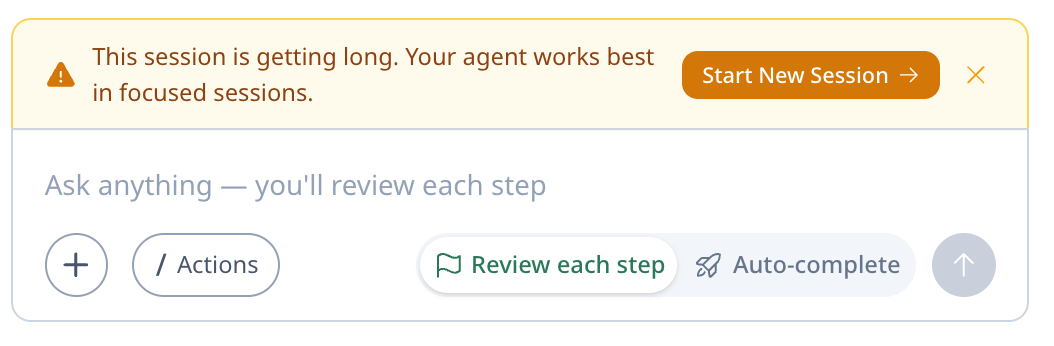
        <content type="html"><![CDATA[<p>当对话轮数或复杂度过高时，系统会弹出提示框，建议您开启新会话以保持最佳体验。</p>
<!-- -->
<!-- -->
<img src="https://doc.morphmind.ai/zh-Hans/assets/images/session-complexity-warning-372d00574ea4ffa24509d8ed5ec1cd46.png" alt="会话复杂度预警提示框" style="max-width:720px;width:100%;border-radius:8px;border:1px solid #e2e8f0;margin-top:12px">
<div class="theme-admonition theme-admonition-tip admonition_xJq3 alert alert--success"><div class="admonitionHeading_Gvgb"><span class="admonitionIcon_Rf37"><svg viewBox="0 0 12 16"><path fill-rule="evenodd" d="M6.5 0C3.48 0 1 2.19 1 5c0 .92.55 2.25 1 3 1.34 2.25 1.78 2.78 2 4v1h5v-1c.22-1.22.66-1.75 2-4 .45-.75 1-2.08 1-3 0-2.81-2.48-5-5.5-5zm3.64 7.48c-.25.44-.47.8-.67 1.11-.86 1.41-1.25 2.06-1.45 3.23-.02.05-.02.11-.02.17H5c0-.06 0-.13-.02-.17-.2-1.17-.59-1.83-1.45-3.23-.2-.31-.42-.67-.67-1.11C2.44 6.78 2 5.65 2 5c0-2.2 2.02-4 4.5-4 1.22 0 2.36.42 3.22 1.19C10.55 2.94 11 3.94 11 5c0 .66-.44 1.78-.86 2.48zM4 14h5c-.23 1.14-1.3 2-2.5 2s-2.27-.86-2.5-2z"></path></svg></span>提示</div><div class="admonitionContent_BuS1"><p>在较长的对话中确认提示框出现，点击后可选择新建会话。</p></div></div>
<p><a href="https://agentlab.morphmind.ai/" target="_blank" rel="noopener noreferrer" class="">立即试用 →</a></p>]]></content>
        <category label="improvement" term="improvement"/>
        <category label="release-2026-04-02" term="release-2026-04-02"/>
    </entry>
    <entry>
        <title type="html"><![CDATA[分享回放（看一场"工作流的电影"）]]></title>
        <id>https://doc.morphmind.ai/zh-Hans/whats-new/share-replay</id>
        <link href="https://doc.morphmind.ai/zh-Hans/whats-new/share-replay"/>
        <updated>2026-04-02T00:00:00.000Z</updated>
        <summary type="html"><![CDATA[把整段 AI 工作过程分享出去，接收者无需登录就能看到完整对话与工作流执行情况。]]></summary>
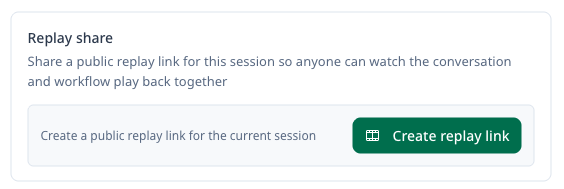
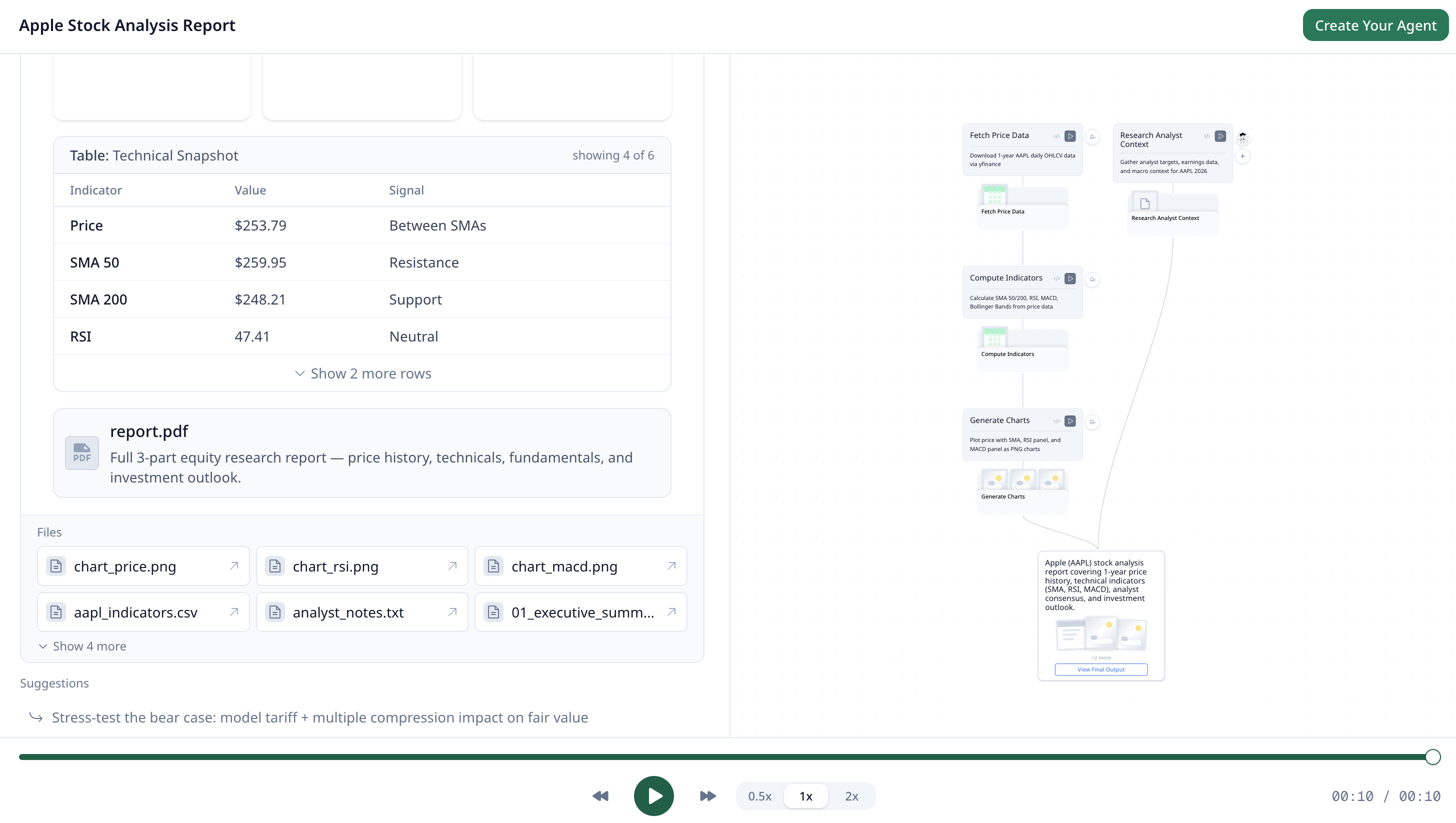
        <content type="html"><![CDATA[<p>除了可以分享智能体，现在您还可以将某次会话生成回放链接并分享给他人。</p>
<!-- -->
<p>我们发现一个很有意思的用法：把完整的 AI 工作过程分享出去，让别人像看一段"工作流电影"一样理解您是怎么做出来的。</p>
<p>接收者<strong>无需登录</strong>，就可以完整看到对话过程和工作流执行情况。很多时候，这种"过程可见"的分享，其实更容易被理解、也更容易传播，甚至可能让您的工作本身更容易出圈。</p>
<!-- -->
<img src="https://doc.morphmind.ai/zh-Hans/assets/images/session-replay-fb6ec3535acdec193490c2768a67df24.png" alt="会话菜单中的「创建回放链接」按钮" style="max-width:480px;width:100%;border-radius:8px;border:1px solid #e2e8f0;margin-top:12px">
<img src="https://doc.morphmind.ai/zh-Hans/assets/images/session-replay-2-2f6665b715ecbf18ba49b98ced95012c.png" alt="带有工作流时间轴的回放播放视图" style="max-width:720px;width:100%;border-radius:8px;border:1px solid #e2e8f0;margin-top:12px">
<div class="theme-admonition theme-admonition-tip admonition_xJq3 alert alert--success"><div class="admonitionHeading_Gvgb"><span class="admonitionIcon_Rf37"><svg viewBox="0 0 12 16"><path fill-rule="evenodd" d="M6.5 0C3.48 0 1 2.19 1 5c0 .92.55 2.25 1 3 1.34 2.25 1.78 2.78 2 4v1h5v-1c.22-1.22.66-1.75 2-4 .45-.75 1-2.08 1-3 0-2.81-2.48-5-5.5-5zm3.64 7.48c-.25.44-.47.8-.67 1.11-.86 1.41-1.25 2.06-1.45 3.23-.02.05-.02.11-.02.17H5c0-.06 0-.13-.02-.17-.2-1.17-.59-1.83-1.45-3.23-.2-.31-.42-.67-.67-1.11C2.44 6.78 2 5.65 2 5c0-2.2 2.02-4 4.5-4 1.22 0 2.36.42 3.22 1.19C10.55 2.94 11 3.94 11 5c0 .66-.44 1.78-.86 2.48zM4 14h5c-.23 1.14-1.3 2-2.5 2s-2.27-.86-2.5-2z"></path></svg></span>提示</div><div class="admonitionContent_BuS1"><p>分享的是快照，不会影响您的原始会话。可以随时撤销分享链接。</p></div></div>
<p><a href="https://agentlab.morphmind.ai/" target="_blank" rel="noopener noreferrer" class="">立即试用 →</a></p>]]></content>
        <category label="feature" term="feature"/>
        <category label="release-2026-04-02" term="release-2026-04-02"/>
    </entry>
    <entry>
        <title type="html"><![CDATA[Ask MM:无需离开平台即可获得帮助]]></title>
        <id>https://doc.morphmind.ai/zh-Hans/whats-new/ask-mm</id>
        <link href="https://doc.morphmind.ai/zh-Hans/whats-new/ask-mm"/>
        <updated>2026-03-18T00:00:00.000Z</updated>
        <summary type="html"><![CDATA[不确定如何开始或如何引导您的 AI 团队？随时在平台内询问 MM 获取快速指引。]]></summary>
        <content type="html"><![CDATA[<p>不确定如何开始或如何引导您的 AI 团队？随时<strong>询问 MM</strong> 获取快速指引——直接在平台内完成。</p>
<!-- -->
<p>任何关于 MorphMind 使用方式的问题都可以提问。MM 基于产品文档和知识构建，因此回答准确，并能根据您当前所在的位置提供情境化建议。</p>
<p><a class="" href="https://doc.morphmind.ai/zh-Hans/learn/advanced-features">了解使用方式 →</a></p>]]></content>
        <category label="feature" term="feature"/>
        <category label="release-2026-03-18" term="release-2026-03-18"/>
    </entry>
    <entry>
        <title type="html"><![CDATA[批量选择文件以下载或删除]]></title>
        <id>https://doc.morphmind.ai/zh-Hans/whats-new/batch-select-files</id>
        <link href="https://doc.morphmind.ai/zh-Hans/whats-new/batch-select-files"/>
        <updated>2026-03-18T00:00:00.000Z</updated>
        <summary type="html"><![CDATA[一次选择多个文件以下载或删除——无需逐个处理。]]></summary>
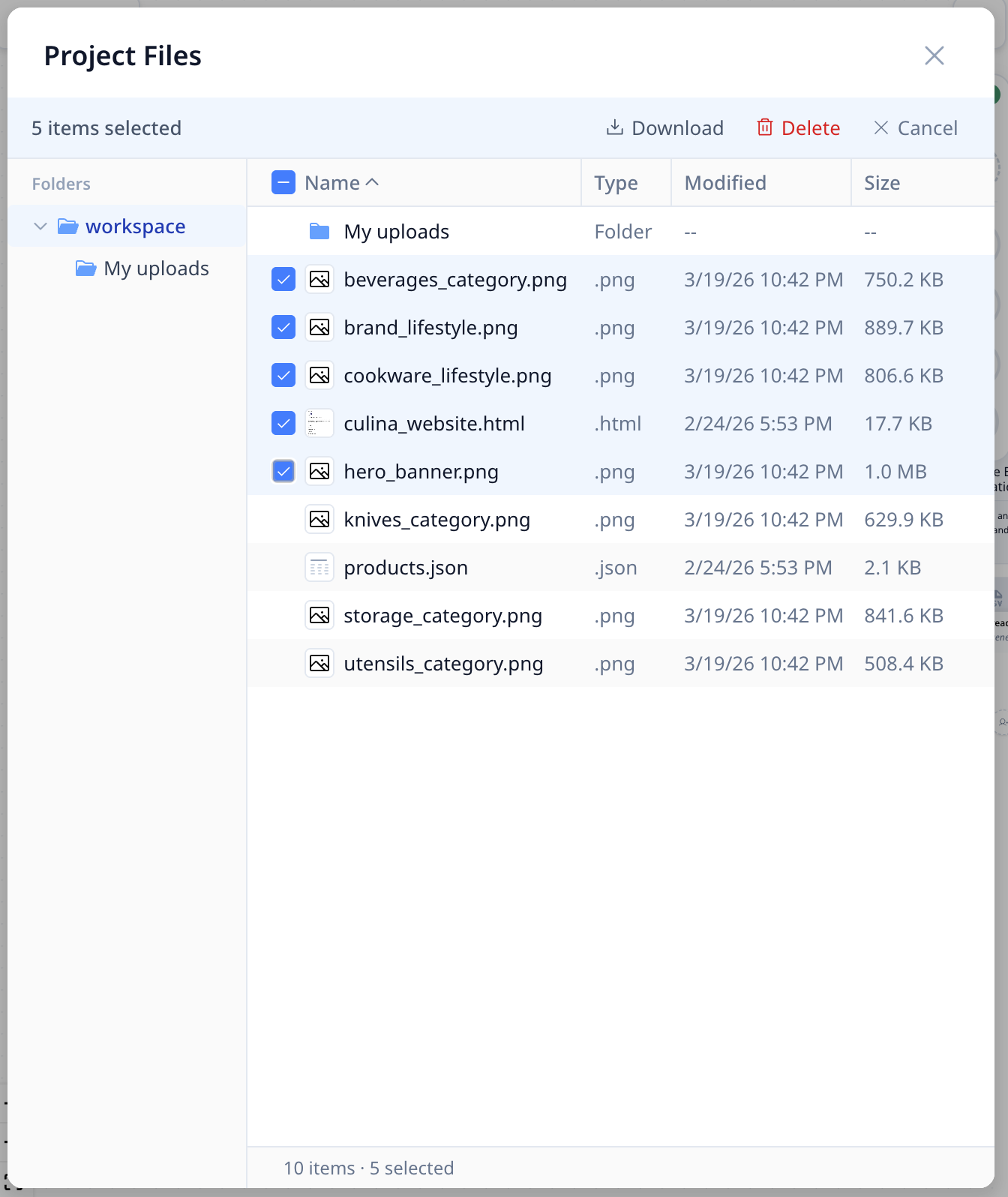
        <content type="html"><![CDATA[<p>一次选择多个文件以下载或删除。<strong>无需再逐个处理每个文件。</strong></p>
<!-- -->
<p>当您需要清理长会话产生的文件，或一次性下载一批生成结果时尤其方便。</p>
<!-- -->
<img src="https://doc.morphmind.ai/zh-Hans/assets/images/batch-selected-5177e6c4fb8a4d24776cb716274cc653.png" alt="批量选择文件，支持多选复选框" style="max-width:720px;width:100%;border-radius:8px;border:1px solid #e2e8f0;margin-top:12px">]]></content>
        <category label="improvement" term="improvement"/>
        <category label="release-2026-03-18" term="release-2026-03-18"/>
    </entry>
    <entry>
        <title type="html"><![CDATA[搜索并添加社区专家技能]]></title>
        <id>https://doc.morphmind.ai/zh-Hans/whats-new/community-specialist-skills</id>
        <link href="https://doc.morphmind.ai/zh-Hans/whats-new/community-specialist-skills"/>
        <updated>2026-03-18T00:00:00.000Z</updated>
        <summary type="html"><![CDATA[浏览其他研究者构建的技能，一键添加到任何专家。]]></summary>
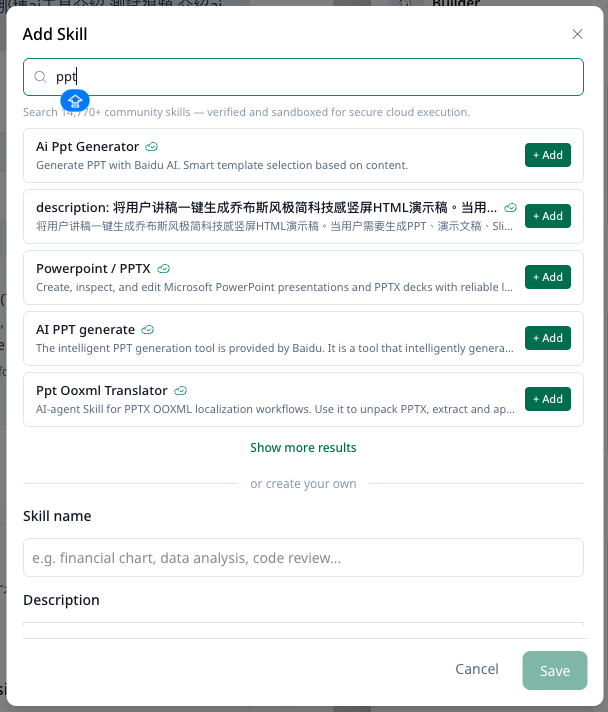
        <content type="html"><![CDATA[<p>直接从 GitHub 社区浏览并添加技能到您项目中的任何专家。</p>
<!-- -->
<!-- -->
<img src="https://doc.morphmind.ai/zh-Hans/assets/images/0318-whats-new-image-a2557247520925929ddffcba98e07eef.png" alt="添加技能面板——搜索社区并添加到专家" style="max-width:720px;width:100%;border-radius:8px;border:1px solid #e2e8f0;margin-top:12px">
<p>技能是预构建的能力——无需从零开始搭建一切，直接接入社区已经构建并验证过的能力。</p>
<p><a class="" href="https://doc.morphmind.ai/zh-Hans/learn/specialist-skills">了解使用方式 →</a></p>]]></content>
        <category label="feature" term="feature"/>
        <category label="release-2026-03-18" term="release-2026-03-18"/>
    </entry>
    <entry>
        <title type="html"><![CDATA[随时切换界面语言]]></title>
        <id>https://doc.morphmind.ai/zh-Hans/whats-new/language-switching</id>
        <link href="https://doc.morphmind.ai/zh-Hans/whats-new/language-switching"/>
        <updated>2026-03-18T00:00:00.000Z</updated>
        <summary type="html"><![CDATA[在「设置」中切换 MorphMind 界面语言——支持英文、简体中文、Español 和 한국어。]]></summary>
        <content type="html"><![CDATA[<p>随时在**「设置」**中切换 MorphMind 的界面语言。支持英文、简体中文、Español 和 한국어。</p>
<!-- -->
<p>便于您与跨地区团队成员协作，或使用您的母语工作。</p>
<p><a href="https://agentlab.morphmind.ai/" target="_blank" rel="noopener noreferrer" class="">打开设置 →</a></p>]]></content>
        <category label="feature" term="feature"/>
        <category label="release-2026-03-18" term="release-2026-03-18"/>
    </entry>
    <entry>
        <title type="html"><![CDATA[试用预构建的示例项目]]></title>
        <id>https://doc.morphmind.ai/zh-Hans/whats-new/sample-projects</id>
        <link href="https://doc.morphmind.ai/zh-Hans/whats-new/sample-projects"/>
        <updated>2026-03-18T00:00:00.000Z</updated>
        <summary type="html"><![CDATA[通过预构建的项目模板和现成的 AI 团队，快速探索 MorphMind。]]></summary>
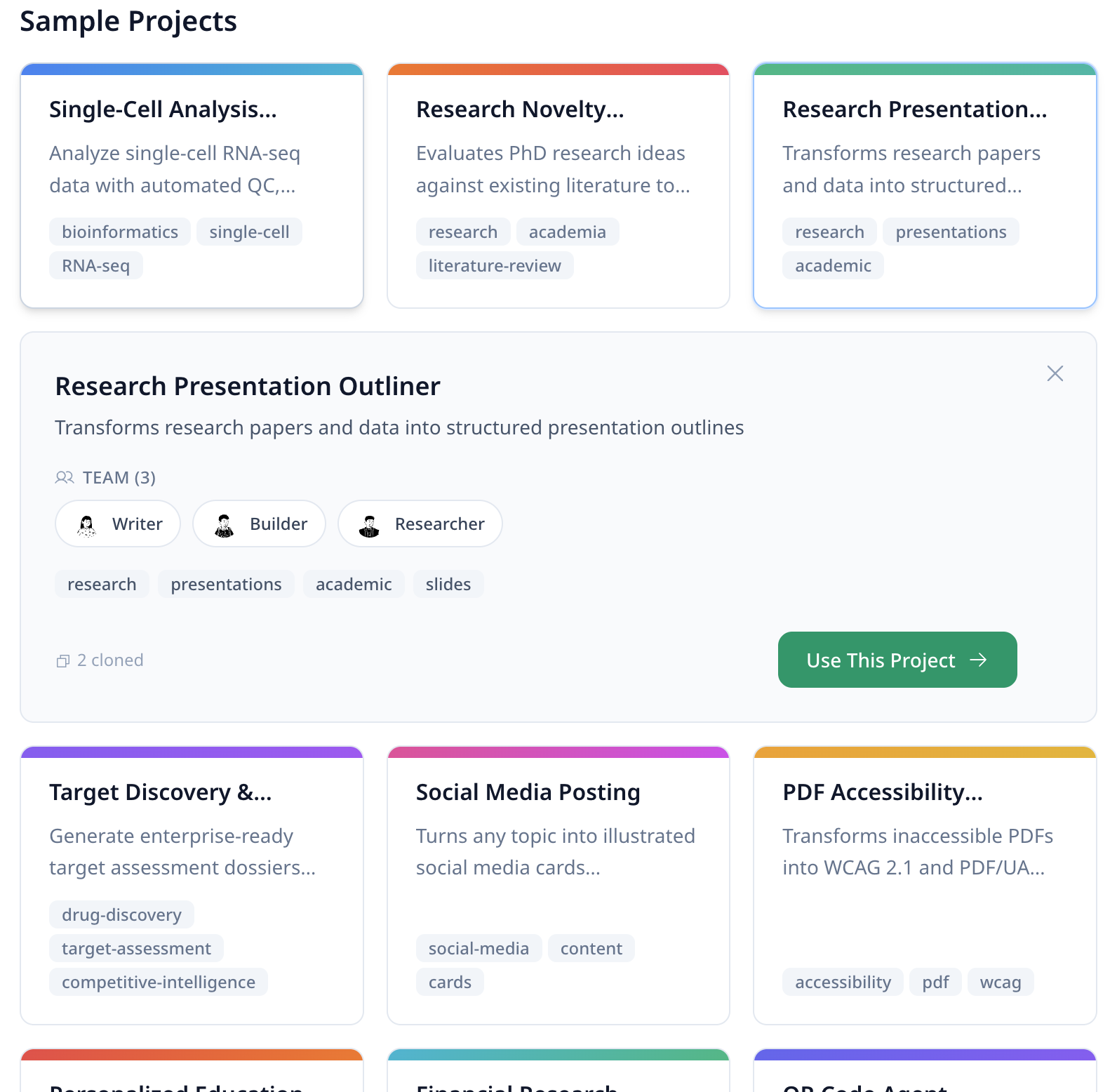
        <content type="html"><![CDATA[<p>使用现成的项目模板，搭配预构建的 AI 团队，快速上手 MorphMind。</p>
<!-- -->
<!-- -->
<img src="https://doc.morphmind.ai/zh-Hans/assets/images/sample-project-1-6bd700358f2299aae97917dc19b64497.png" alt="示例项目" style="max-width:480px;width:100%;border-radius:8px;border:1px solid #e2e8f0;margin-top:12px">
<p>更快地了解一个端到端的 Agent 设置长什么样，再决定是否要从零开始构建您自己的版本。</p>
<p><a href="https://agentlab.morphmind.ai/" target="_blank" rel="noopener noreferrer" class="">浏览示例项目 →</a></p>]]></content>
        <category label="feature" term="feature"/>
        <category label="release-2026-03-18" term="release-2026-03-18"/>
    </entry>
</feed>