Overleaf Writing
Draft LaTeX articles and beamer presentations — plan, write, review, and push back to Overleaf in one session.
The Workflow
| Step | What It Does |
|---|---|
| Connect to Overleaf | Validates your Overleaf Git URL and auth token, clones the project |
| Plan Document Structure | Designs section/slide structure based on your topic and notes |
| Draft Content | Writes LaTeX content for all planned sections using proper beamer frames or article formatting |
| Review & Refine | Reviews for clarity, flow, and formatting — suggests improvements and applies edits |
| Push to Overleaf | Pushes refined LaTeX files back to Overleaf with conflict detection |
How It Was Built
"Draft a beamer presentation on my research topic and push it to my Overleaf project."
MorphMind created a 5-step pipeline: connect to Overleaf via Git, plan the structure, draft content, review, and sync back — all without leaving the chat.
Why This Works Better Than a Chatbot
Writing is subjective. A presentation for your advisor reads differently than one for a conference audience. A methods section has different conventions in biology vs. physics. ChatGPT doesn't know any of that — it rushes to generate.
- It skips the planning step — you say "write a presentation on my research" and ChatGPT produces 15 slides immediately. But it guessed the structure, the audience, the level of detail. You spend more time rearranging and deleting than you would have spent outlining first. Here, there's a dedicated planning step — you approve the structure before a single word is written.
- Your intent gets lost in the output — you wanted the emphasis on methodology, but the chatbot spent 8 slides on background. You re-prompt, and now it overcorrects. Each revision is a coin flip because the chatbot doesn't separate what to say from how to say it. A workflow keeps structure and content as distinct, editable steps.
- It generates once, then you're on your own — the first draft is the final draft. If the framing is off but the technical content is fine, you can't ask it to revise just the framing without risking changes to the rest. Here, the review step checks clarity and flow independently of the content step.
| The Problem | Workflow Approach |
|---|---|
| ChatGPT generates immediately — guesses structure and audience | Dedicated planning step you approve before writing begins |
| Re-prompting changes everything, not just the part you wanted | Structure, drafting, and review are separate editable steps |
| First draft is the final draft — no built-in revision | Review step checks clarity and flow before pushing to Overleaf |
| No connection to your project — copy-paste into Overleaf | Direct Git integration — pushes to your Overleaf project |
How to Connect
Step 1: Get your Overleaf Git URL
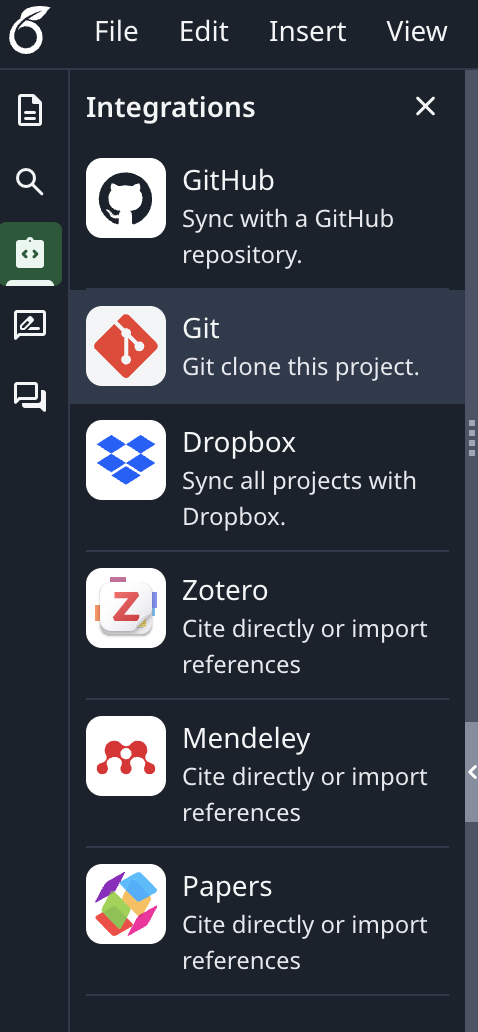
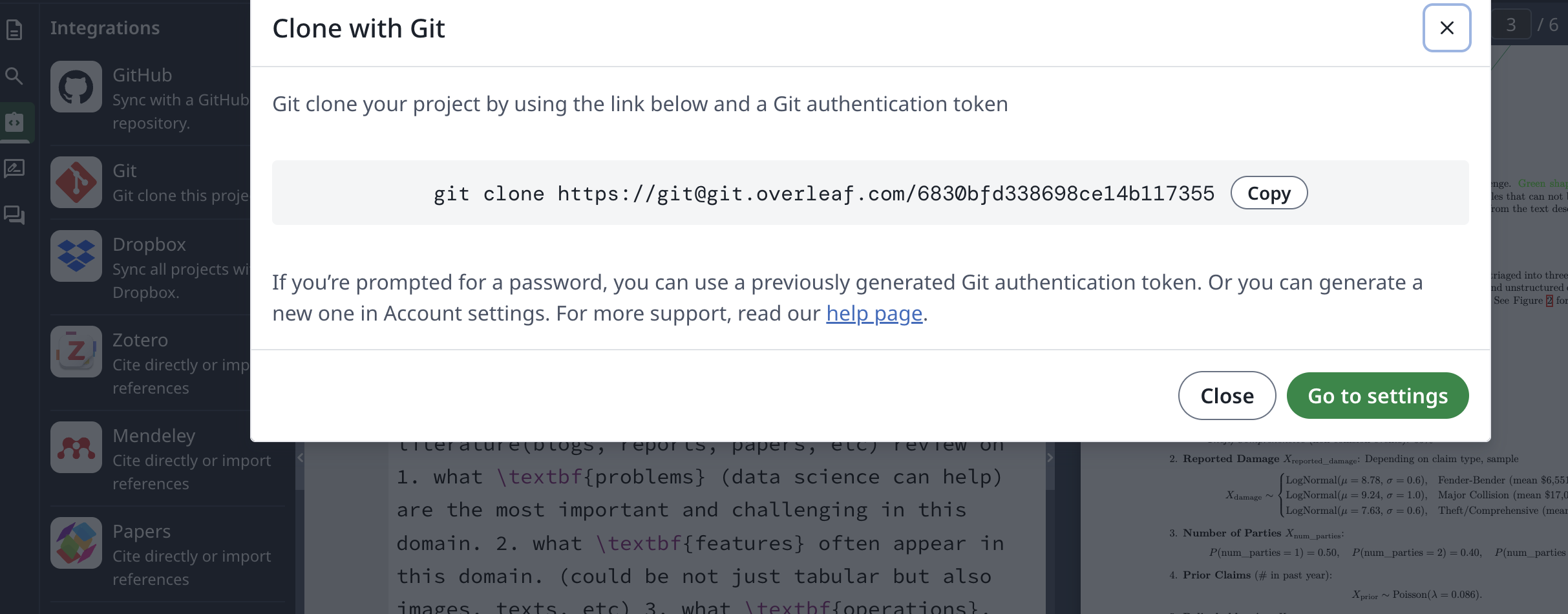
In your Overleaf project, click Integrations → Git and copy the clone URL.
Step 2: Get your auth token
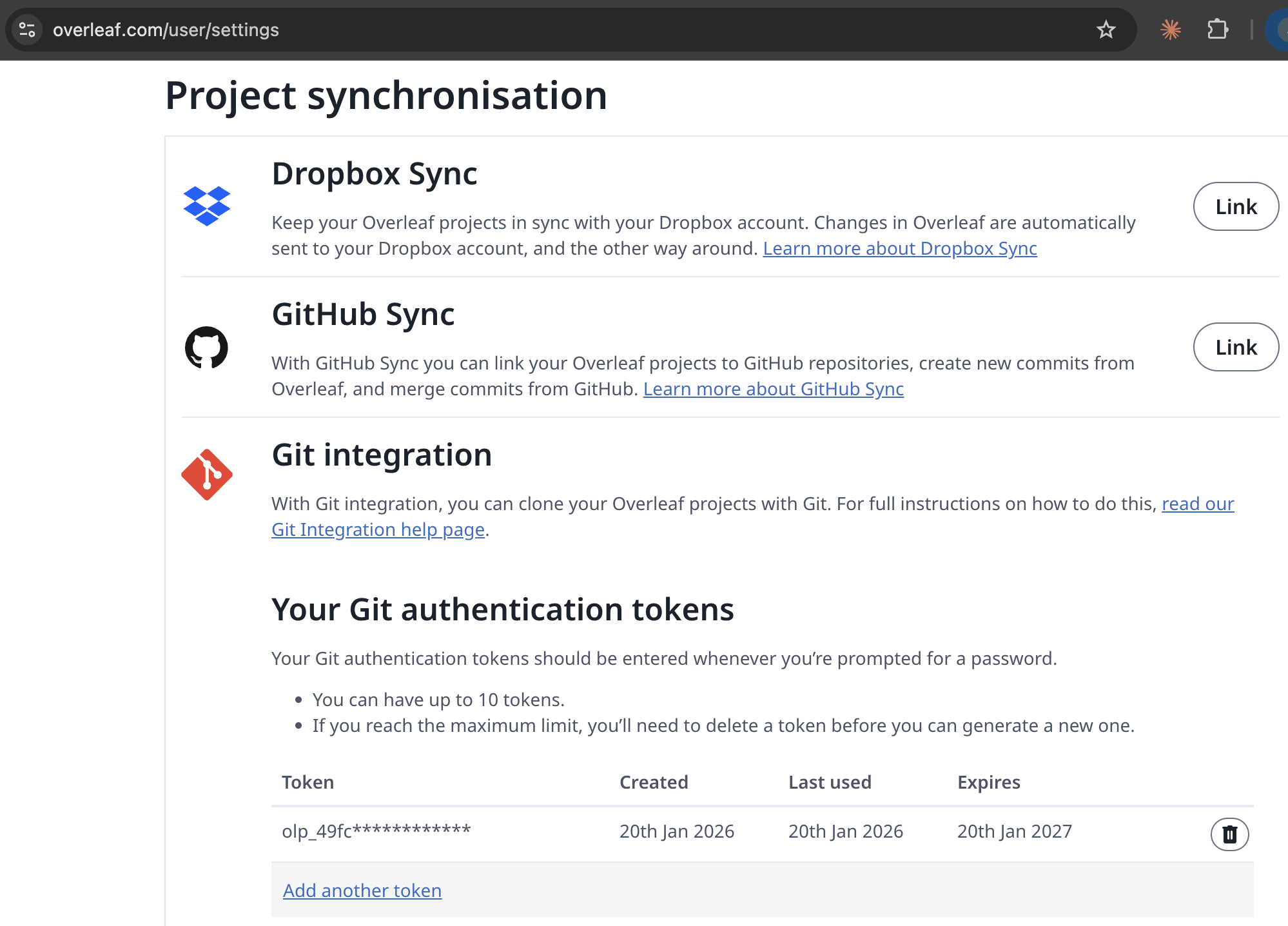
Go to overleaf.com/user/settings → Git integration → create or copy your token.
Step 3: Connect and start writing
Connect to my Overleaf project.
Git URL: https://[email protected]/[PROJECT_ID]
Token: [YOUR_TOKEN]
Draft a beamer presentation on [your topic].
Example Prompts
Connect to my Overleaf project and draft a 20-minute research presentation on single-cell genomics.
Write an article introduction and methods section based on these notes: [paste notes]
Review my existing draft in Overleaf and suggest improvements to the results section.
Frequently Asked Questions
Can AI write LaTeX directly in Overleaf?
This agent connects to your Overleaf project via Git, writes LaTeX content locally, and pushes it back. You see the changes in Overleaf immediately — no copy-pasting or file uploads needed.
Does AI handle beamer presentations and articles?
Yes. The agent supports both beamer slide decks (with frames, columns, and figures) and standard article formatting (abstract, sections, bibliography). Specify which format you want when you describe your project.
Will AI overwrite my existing Overleaf files?
The agent includes conflict detection. Before pushing, it checks for changes you made in Overleaf since the last sync. Conflicts are flagged for your review rather than silently overwritten.