Personal Website Builder
Build and deploy a personal academic website — from your CV to a live GitHub Pages site.
The Workflow
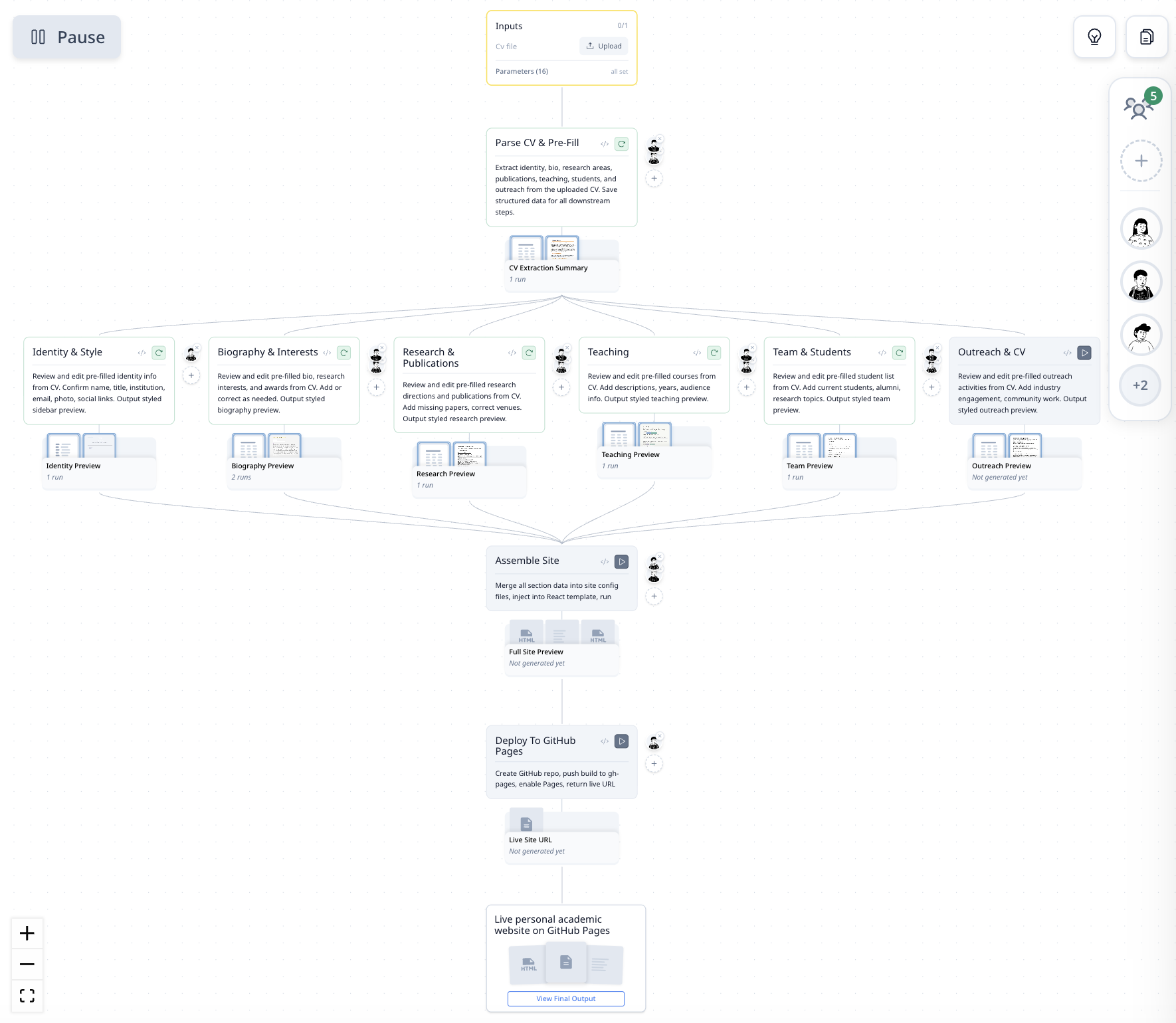
| Step | What It Does |
|---|---|
| Parse CV & Pre-fill | Extracts identity, bio, publications, teaching, students, and outreach from your uploaded CV |
| Identity & Style | Review and edit your name, title, institution, photo, social links |
| Biography & Interests | Review and edit your bio, research interests, and awards |
| Research & Publications | Review and edit research directions and publication list |
| Teaching | Review and edit courses, years, audience |
| Team & Students | Review and edit current students, alumni, research topics |
| Outreach & CV | Review and edit outreach activities and industry engagement |
| Assemble Site | Merges all sections into a React + Tailwind template and builds the site |
| Deploy to GitHub Pages | Creates a GitHub repo, pushes the build, enables Pages — returns a live URL |
How It Was Built
"Build a personal academic website from my CV. Let me review each section before publishing. Deploy to GitHub Pages."
MorphMind created a 9-step pipeline: parse the CV, pre-fill every section, let the user edit each one with styled previews, assemble the site, and deploy — all in one session.
Why This Works Better Than a Chatbot
Ask ChatGPT to "build me a website from my CV" and you get a block of HTML. Now what? The problem:
- It generates the whole site at once — if your publications section is wrong but your bio is perfect, you have to re-generate everything. There's no way to fix one section without losing your edits to another.
- No preview before deploying — you get raw code with no way to see what it looks like until you manually set up hosting, push files, and load it in a browser. Here, each section shows a styled preview before you commit.
- It doesn't know your CV — you paste your CV, the chatbot summarizes it, and you spend the next hour correcting names, dates, and paper titles. This agent parses your CV into structured fields that you review section by section.
| The Problem | Workflow Approach |
|---|---|
| One monolithic HTML output — can't fix one section | Each section is independent — edit bio, keep publications |
| No preview until you manually deploy | Styled preview for every section before assembly |
| Paste CV, get approximate summary, correct manually | Structured CV parsing into editable fields |
| "Here's your code" — figure out hosting yourself | One-click deploy to GitHub Pages with live URL |
Example Prompts
Here's my CV — build my personal website. I'm an assistant professor at MIT.
Update my publications section — add my new paper from Nature Methods 2025.
Change the color scheme to dark mode and redeploy.
Frequently Asked Questions
Can AI build a personal academic website from a CV?
Yes. This agent parses your CV (PDF), extracts structured data for each section (bio, publications, teaching, team), and lets you review and edit each section with styled previews before assembling and deploying the site.
How do I deploy an academic website to GitHub Pages?
Upload your CV, review the pre-filled sections, and click deploy. The agent creates a GitHub repository, pushes the built site, enables GitHub Pages, and returns a live URL. No terminal commands or Git knowledge required.
What tech stack does the generated website use?
The site is built with React, Vite, and Tailwind CSS — modern, fast, and mobile-responsive. The agent handles all the build configuration so you only interact with content, not code.